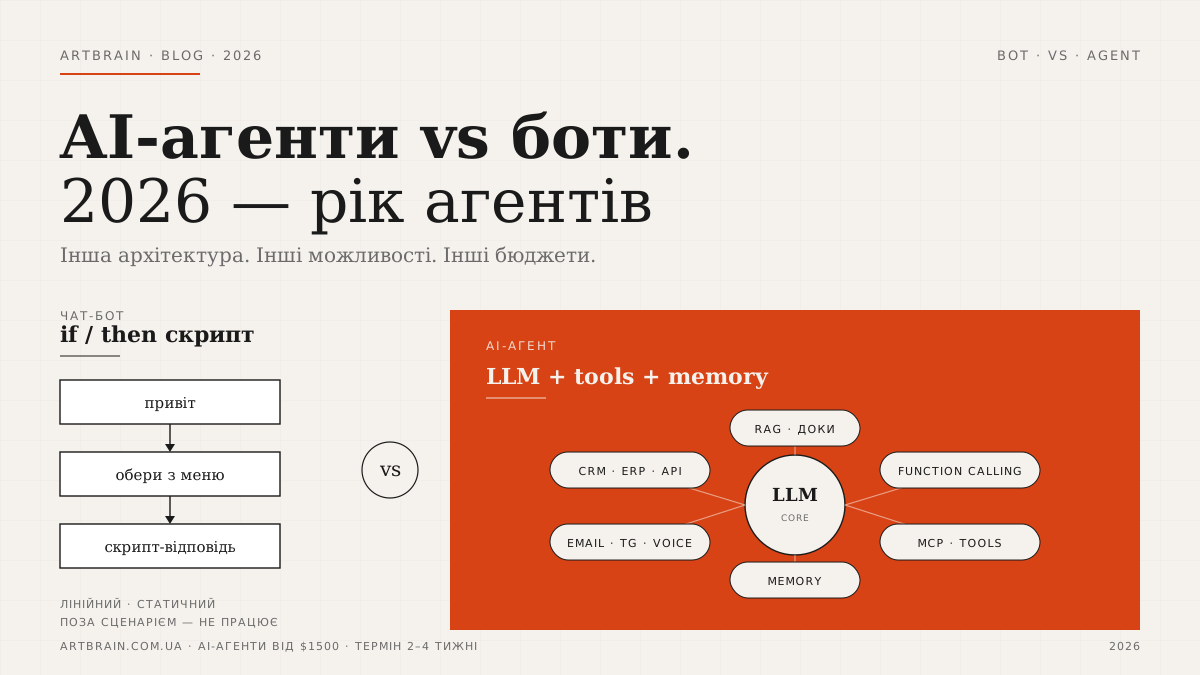
2026 is a turning point for AI-powered business automation. The chatbots of the 2010s, built around buttons and scripted flows, are being replaced by AI agents. This is not a new marketing label for the same tool. The architecture is different: a bot follows predefined rules, while an agent combines an LLM, tools, memory, access to data, and multi-step reasoning. A regular bot says: “press 1, 2, or 3.” An AI agent can understand a customer request, find the right data in documents, check CRM, prepare an action, and send it to a manager for confirmation.
For small and medium-sized businesses, this matters not because AI is fashionable, but because the practical level of automation has changed. In the past, automation worked mostly for simple repeated flows. Now you can automate a process where input arrives in different formats: an email, a voice message, a PDF, a website form, or a messenger chat. Below we break down how an AI agent differs from a chatbot, which tasks already make sense for agents in 2026, what you need to launch one, and what AI agent development at Artbrain costs.
Short answer: a chatbot is scripted automation, while an AI agent is a system that can complete several steps toward a result within defined rules. A bot works well when a user selects an option from a menu or asks a typical FAQ question. An agent is needed when the request does not fit into one button: it must parse text, find information in a knowledge base, call a tool, check data, save a result in CRM, or prepare a response for a human. Technically, an agent consists of a language model, tools, memory, knowledge sources, and safety controls. In 2026, agents became practical for SMBs because LLM usage became cheaper, function calling became standard, RAG and memory became clearer in production, and MCP from Anthropic shaped a neutral industry standard for connecting models to external systems. A business does not always need an agent: for a simple menu, a chatbot is better. But for leads, documents, email, voice, and coordination between systems, an agent is already a different level.
What Is a Chatbot: Automation from the 2010s
A classic chatbot is scripted automation. It has a dialogue tree: if the user clicks “Delivery,” show delivery terms; if “Payment,” show payment methods; if “Leave a request,” collect name, phone, and comment. Such bots became popular in the 2010s because they quickly solved simple support and sales tasks without building a complex business system.
A scripted bot works well when the process is stable and predictable. Examples: booking a consultation, showing a service menu, collecting contacts, answering 10–20 typical questions, sending a lead to a manager, or sending notifications to Telegram. For these tasks, there is no reason to overcomplicate the architecture. Chatbot development at Artbrain starts from $300, and it is the right solution when the business needs scripted logic.
The problem starts when the user does not follow the script. “I need the same as last time, but with delivery to another address,” “I have a PDF specification, tell me what fits,” “move this email into a request and attach the invoice” — this is chaos for a button-based bot. It either asks the user to choose from a menu or passes everything to a human. This is where AI agents become useful.
What Is an AI Agent: The Next Level
An AI agent is not just a chat with GPT. It is a software system where the language model is the “brain,” but not the only component. The agent receives a task, understands context, decides which steps are needed, calls tools, works with memory, and returns the result in the format the business needs. If a chatbot responds by if/then logic, an agent behaves like a controlled operator: it has a goal, a set of allowed actions, and constraints.
A typical agent architecture has four key parts. The first is the LLM: GPT, Claude, Gemini, or another model that understands text and forms decisions. The second is tools: functions through which the agent can check order status, create a lead in CRM, find a product, send an email, or retrieve data from an API. The third is memory: short-term dialogue context and longer-term memory about a client, rules, and previous actions. The fourth is control: access roles, logging, human confirmation for critical actions, and limits on what the agent can do on its own.
This is why an AI agent differs from an AI chat. A chat can answer a question. An agent can execute a process: read an email, extract data, ask for missing details, save a request in a system, and leave a structured summary for a manager. If you only need FAQ answers, an agent may be excessive. If you need to connect communication, documents, and business systems, this is agent territory.
Why 2026 Is the Year of Agents
AI agents became practical in 2026 not because of one big breakthrough, but because several factors converged. First, LLM usage became cheaper. Businesses can now run not only demo chats, but real processes with regular requests, without turning every model response into a separate budget risk.
Second, function calling became a standard part of LLM architecture. A model no longer only generates text. It can return a structured call: create a request, find a customer, check a status, prepare an invoice. This is what turns an LLM from a “smart text box” into part of a business process.
Third, RAG, vector search, and memory became clearer for production use. The agent does not have to answer from general knowledge. It can search your documents, instructions, policies, commercial proposals, and knowledge bases. This reduces the risk of random answers and makes the system useful for your specific company.
Fourth, the industry now has a shared approach for connecting models to tools. For businesses, this means a simpler path to agents that do not live separately from CRM, email, documents, and internal systems.
There is also a less technical factor: businesses gained experience after the first wave of AI chats. Teams now understand that a “smart answer” does not solve a process by itself. They need data sources, rules, integrations, responsible people, and transparent logs. That is why demand is moving from experiments to agents that fit into real operations. This is especially visible in companies where managers move between email, CRM, documents, messengers, and spreadsheets every day.
5 Scenarios Where You Need an Agent
1. CRM Requests from Different Formats
In real business, leads rarely arrive in a clean identical form. One customer writes in chat: “we need to update the website, budget is discussable.” Another sends an email with a PDF. A third sends a voice message. A fourth fills a website form but puts half the data into the “comment” field. A regular bot can collect a lead if the user follows its script. An AI agent can parse the incoming text, extract name, company, contacts, task type, deadline, missing fields, and form a structured lead.
Important: the agent should not change CRM without control. A proper architecture includes validation, logging, and rules: what can be written automatically, and what requires manager confirmation. In this setup, the agent does not replace CRM. It makes incoming data usable.
2. RAG Support from Documents
Support teams often suffer not from a lack of people, but from scattered knowledge. Warranty terms are in one document, manager instructions in another, return policy in a third, prices in a spreadsheet. A chatbot can only answer what someone manually wrote into it. An AI agent with RAG can find relevant fragments in documents and build a response from sources.
This is useful for customer support, internal help desk, employee onboarding, and consultations on complex products. The agent should show the source or at least store it in logs so the team can verify the answer. If the question has no support in the documents, the agent should pass it to a human instead of inventing.
3. Email Agent
Email is still a working channel for B2B, service companies, and complex sales. But messages often arrive in free form: price requests, clarifications, attachments, replies inside old threads, requests to change terms. An email agent can classify the message, find the related deal, prepare a draft reply, extract attachments, create a task, or notify the responsible manager.
Control is critical here. The agent can prepare drafts and structure data, but sending a commercial proposal or legally important reply should stay with a human. This does not reduce the agentʼs value: it removes mechanical preparation and lowers the chance of missed details.
4. Voice Orders
In messengers, customers often send voice messages instead of text. For a scripted bot, this is almost a dead end: it requires transcription, understanding the content, clarifying details, and turning spoken language into structure. An AI agent can accept a voice message, convert it to text, extract order items, address, contact, and notes, then pass it into the system as a normal request.
This is especially useful when filling a form is inconvenient for the customer: service requests, delivery, B2B supply, or internal employee requests. But limits are still required: the agent should clarify ambiguous data, show a summary, and ask for confirmation before creating an order.
5. Coordination Between Systems
The most valuable agentic scenarios appear when one action touches several systems. For example, a customer asks to change a delivery address. The agent must find the order, check the status, understand whether the change is still possible, update the data or create a task for the manager. Or a manager asks: “prepare a short status on this client before the call.” The agent can gather data from CRM, email, tasks, and documents into a concise summary.
A scripted bot becomes a set of separate commands in this situation. An AI agent fits better because it can understand intent, choose a tool, complete several steps, and return the result in a human-readable format. This is not magic. It is the right integration architecture.
What an AI Agent Needs
To work in a business, an AI agent needs more than “connecting GPT.” It needs an architecture with several layers. The first layer is the language model that understands requests and forms an action plan. The second is tools: APIs of your CRM, email, website, product database, calendar, and documents. The third is knowledge: documents, FAQ, policies, price lists, and instructions the agent can use through RAG.
The fourth layer is memory. The agent should remember the context of the current dialogue, but it should not blindly store everything forever. Business needs rules: which data can be stored, where it is stored, who has access, and how it can be deleted or updated. The fifth layer is control. This means access rights, a list of allowed actions, confirmation for risky operations, logs, and limits by amount, action type, or data category.
Data readiness is a separate part of the work. If documents are outdated, price lists contradict each other, and policies live only in a managerʼs head, the agent will not create order by itself. Before launch, we review which files are actually current, which answers can be shown to customers, which topics should be handed to a human, and how the knowledge base will be updated after release. This is the less flashy part of the project, but it is what separates a working agent from a nice demo. Answer quality depends not only on the model, but also on the context it receives.
Control is what separates a working agent from a dangerous demo. A good agent does not “do everything.” It does only what is allowed, leaves an audit trail, and can hand the case to a human when confidence is not enough.
How Much an AI Agent Costs at Artbrain
At Artbrain, development of AI assistants and agents starts from $1,500. A typical launch timeline is 2–4 weeks. This is the real starting price from our service page, not a made-up package tier. The final scope is defined after a short brief: which data sources are needed, which tools should be connected, what the agent can do automatically, and what it should only prepare for human confirmation.
If you need a simple scripted bot without agentic logic, it is better to start with chatbot development from $300. If you need LLM, RAG, memory, system integrations, and multi-step actions, then an agent is the right direction. The AI assistant service page lists starting prices and the base scope; an audit can clarify the architecture before development. We do not sell “AI for the sake of AI”: if a scripted bot solves the task better, we will say that.
What an AI Agent Looks Like in Practice
Picture a normal day in a sales department. A manager comes to work with 50+ messages already waiting: website forms, Telegram questions, emails, voice messages on Viber, missed calls. Each one needs a reaction: log in CRM, score the priority, write a first reply, create a task. By lunchtime there is no time left for new leads.
An AI agent takes this part of the work off their plate. It reads inbound from all channels, recognises the intent (price request, complaint, new lead, product question), creates a card in CRM, drafts a short reply and hands the manager ready context. The manager does not start the conversation from zero — they continue it.
Another scenario — support that references your own documents. In larger companies the base of policies, instructions and contracts is hundreds of pages. A regular bot does not help here: it only knows what was hard-coded into it. An agent with RAG reads your base, finds the right paragraph of a policy, quotes it in the reply to the customer and adds a link to the document. If the question is non-standard — it escalates to a person with a ready summary.
These are the scenarios that show the real difference between a bot and an agent. A bot can open a menu. An agent can read context, check documents, draw a conclusion and execute an action across several systems at once. This is not the future — it already works in 2026.
How We Build AI Agents
The Artbrain process starts not with choosing a model, but with the business process to automate. We describe the agentʼs tasks, data sources, limits, user roles, and points where human confirmation is required. Then we design the architecture: LLM, RAG, memory, tools, integrations, and event logs.
- Brief and process audit — we define where an agent is truly needed, and where a scripted bot is enough.
- Architecture — we describe tools, data, access rules, and handoff scenarios.
- Prototype — we assemble a working scenario using real examples of requests.
- Integrations and control — we connect CRM, email, documents, APIs, logging, and action confirmation.
- Launch and tuning — we test on your data, remove unnecessary actions, and refine rules.
A typical AI agent timeline is 2–4 weeks, depending on the number of integrations and the quality of input data. If you are not sure where to start, an audit is the practical first step: it quickly shows where an agent will help and where simpler automation is smarter.
Summary
Chatbots remain useful in 2026, but their zone is simple scripts, menus, and predictable FAQ. AI agents are needed where the request is unclear, data is scattered, several actions are required, and the result must land in a business system. That is why 2026 looks like the year of agents: models are more accessible, tools are more mature, and businesses have enough experience to separate a demo from working automation.
Teams that adopt agents earlier do not get “magic AI.” They get better operational discipline: leads are structured, documents are available, emails do not get lost, and systems work together. If you want to understand which format fits your business — scripted bot, AI agent, or a CRM-connected combination — contact Artbrain. Also read our article on AI assistants and business costs: it complements this article from the financial side without repeating the architecture.
FAQ
How is an AI agent different from a chatbot?
A chatbot follows a predefined script: buttons, commands, FAQ answers, and simple if/then rules. It works well for service menus, booking a consultation, collecting contacts, or answering typical questions. An AI agent has a different architecture: an LLM, tools, memory, RAG search across documents, and control rules. It can understand free-form text, complete several steps, call CRM or another system, prepare an action, and send it to a human for confirmation. In simple terms, a bot automates a script, while an agent automates part of a business process.
How much does AI agent development cost in 2026?
The price depends on scope, integrations and timeline. We prepare an exact estimate after a free review of your task.
What business tasks can be delegated to an AI agent?
An AI agent is useful for tasks where input arrives in free form and several controlled steps are needed. Examples include parsing emails and preparing draft replies, structuring leads for CRM, finding answers in documents through RAG, preparing a short customer summary, handling voice orders after transcription, classifying requests, and routing them to responsible people. Critical actions — sending commercial proposals, changing financial data, or giving legally important answers — should usually remain under human confirmation. The agent should support the process, not act without limits.
Is it safe to give an AI agent access to my data?
Yes, if access is designed correctly. An AI agent should not have unlimited access to all company data. We define roles, allowed tools, access levels, action logs, and confirmation rules. For documents, a RAG approach is used: the agent searches relevant fragments in approved sources instead of “knowing everything.” Risky operations require human confirmation. It is also important not to send unnecessary personal or commercial data to the model. AI agent security is not one checkbox; it is an architecture of access, logging, and control.
How long does AI agent implementation take?
A typical AI agent implementation at Artbrain takes 2–4 weeks. The timeline depends on the number of integrations, document readiness, scenario complexity, and how many actions the agent should perform independently. A simple agent for RAG search or lead structuring launches faster than a system connected to CRM, email, voice, and several access roles. Before development, we run a short brief or process audit: data sources, tools, safety rules, and human confirmation points are defined first. This helps avoid unnecessary scope and launch only the logic the business really needs.