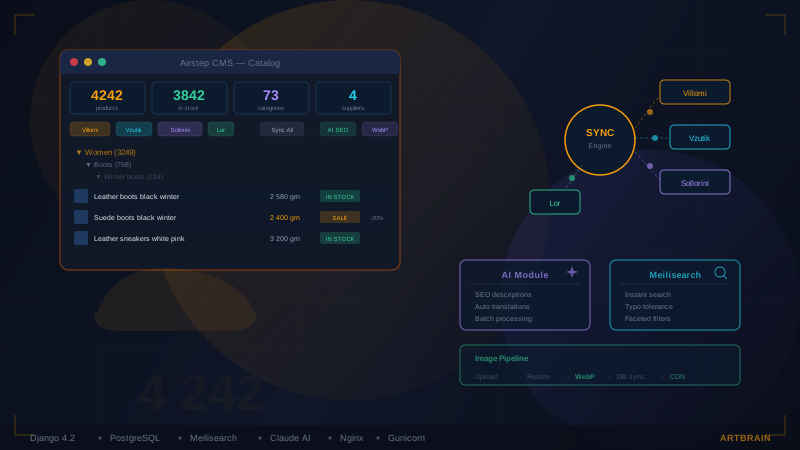
4,242 products (as of March 2026; now over 6,700), 73 categories, 4 suppliers with automatic synchronization, AI-generated descriptions and SEO tags, typo-tolerant search, automatic WebP image conversion – all running on Django 4.2 with PostgreSQL. This is not a tutorial project or an MVP. This is a live production store at airstep.com.ua, serving real customers every day.
In this case study, we will explain how the Artbrain team built a complete e-commerce platform from scratch: from a custom CMS admin panel to zero-downtime deployment. We will break down the technical decisions that made this project fast, manager-friendly, and scalable for the business.
The Challenge: Why Not Shopify, WooCommerce or Prom.ua
The first question any business asks: "Why custom development when ready-made platforms exist?" For Airstep, the answer was obvious:
Working with multiple suppliers simultaneously. Airstep is not a manufacturer but a retailer. Products come from 4 different suppliers, each with their own XML feed, data structure, and pricing rules. No boxed platform supports this scenario out of the box. Custom synchronization logic, category mapping, and automatic markup calculations are required.
Control over the admin panel. Standard e-commerce admin panels are designed for one store with one warehouse. When you have 4,242 products from 4 suppliers and need to bulk-generate descriptions via AI, convert images, and sync inventory – you need a completely different interface. We built a CMS admin panel that lets the manager control the entire catalog from one place.
On Shopify or WooCommerce, this level of control is impossible.
This is exactly the case where custom e-commerce development is not a luxury but a business necessity. We wrote a separate article about why we choose Django for projects like this.
Project Architecture: What Is Under the Hood
The architecture follows the principle of "minimum dependencies, maximum control." We do not use Django REST Framework for the store frontend – it runs on server-side rendering with minimal JavaScript for interactive elements (cart, search, filters). This delivers blazing-fast First Contentful Paint and excellent Core Web Vitals scores.
Synchronization with 4 Suppliers: The Main Challenge
This is the heart of the entire system. Four suppliers – Villomi, Vzutik, Sollorini, and Lor – each have their own XML/YML feed with products. Data updates daily. The task: automatically fetch feeds, parse products, download images, calculate prices with markup, and update the catalog.
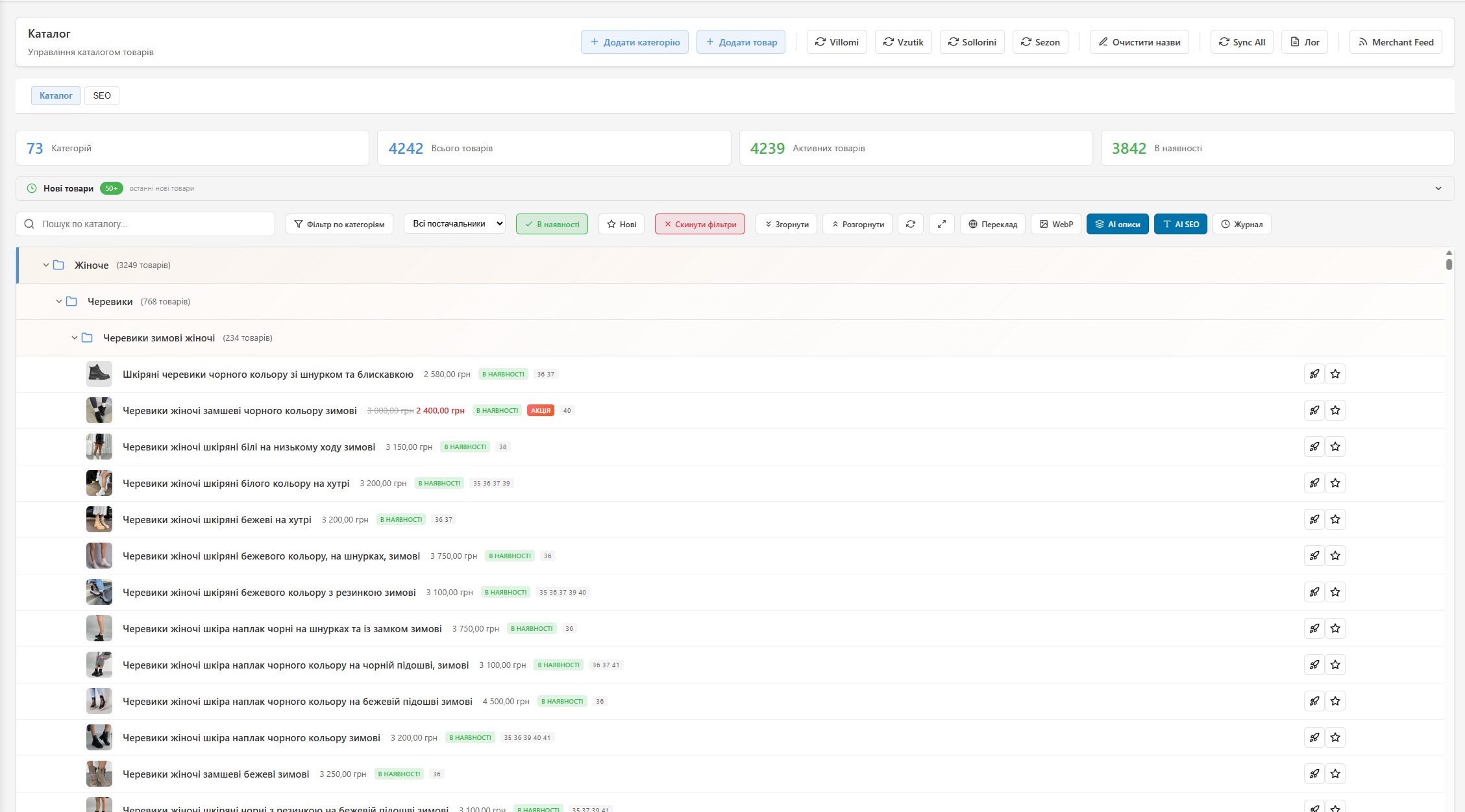
Each supplier is implemented as a separate Django management command. This allows running synchronization either manually via the admin panel (the "Villomi," "Vzutik," "Sollorini," "Lor" buttons in the screenshot), or automatically via cron.
How the Sync Pipeline Works
- Download the XML feed from the supplier
- Parse products – extract name, SKU, price, sizes, colors, materials, images
- Clean names – regex removes supplier brands and SKU codes from titles (buyers should not see internal codes)
- Automatic markup – markup percentage for each supplier is configured in the admin panel
- Category mapping – supplier categories are automatically mapped to store categories
- Download and convert images – photos from supplier URLs are downloaded, converted to WebP, stored locally
- Update or create products – if a product already exists (by sync ID), price, availability, and sizes are updated; if new – it is created
- Manage availability – products no longer in the feed are automatically unpublished
Protection Against Duplicates and Zombie Processes
One of the pitfalls: what happens if a manager clicks the sync button while a previous sync is still running? Or if a cron job starts in parallel with a manual run?
We implemented a PID file system. On start, the sync creates a PID file with the process ID. Before launching a new one, it checks whether a PID file exists and whether the process is alive (via /proc/[pid]/status). If the process is alive – the API returns 409 Conflict. If the PID file exists but the process is dead (zombie) – the file is removed and the new sync starts normally.
AI Module: Description and SEO Tag Generation
One of the most interesting features. The admin panel has a built-in AI module based on the Claude API that can:
- Generate product descriptions – based on name, material, color, and category, AI creates unique HTML descriptions with SEO keywords
- Generate meta tags – title and description for each product, optimized for search queries
- Auto-translate – content is generated in Ukrainian with the option of automatic English translation
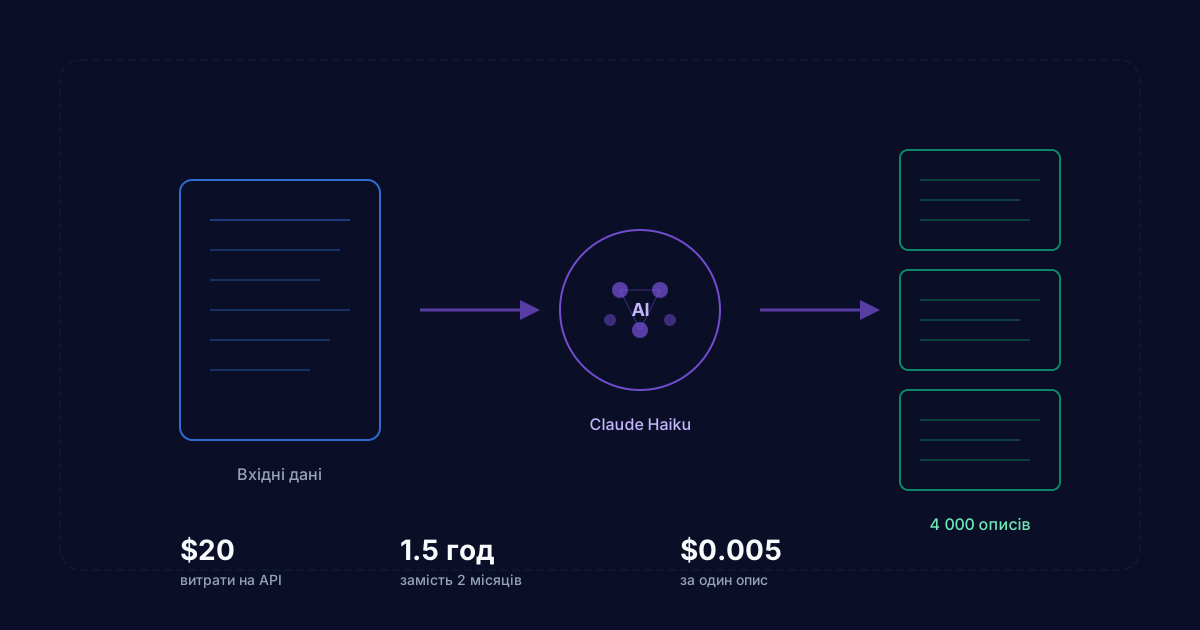
- Batch processing – you can select hundreds of products and run them through AI in one go (the "AI desc" and "AI SEO" buttons in the catalog screenshot)
Everything is logged in ProductActivityLog – for each AI generation, a diff is saved (what was before, what changed after). The manager can always roll back changes.
Admin Panel: Everything Under the Manager's Control
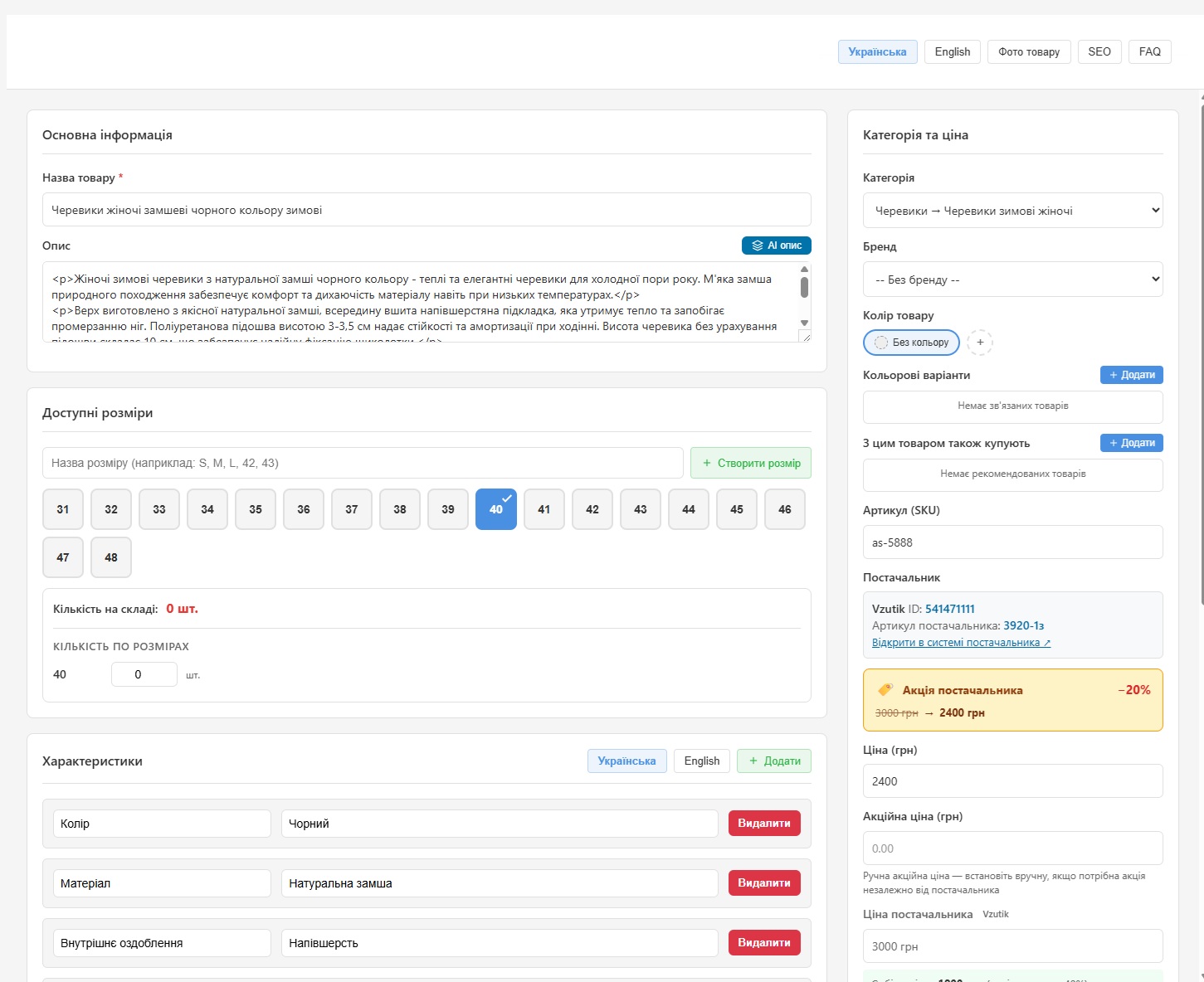
The CMS admin panel is built entirely custom – this is not a standard Django Admin, but a purpose-built interface with thoughtful UX. The product card screenshot shows the key elements:
- Bilingual support – "Ukrainian / English" toggle for all text fields
- AI generation – the "AI desc" button generates a product description with one click
- Visual size selector – interactive size grid instead of a text field
- Characteristics – color, material, interior finish with the ability to add new ones
- Transparent pricing – supplier price, markup, and sale price are all visible. The manager sees the complete picture
- Supplier binding – ID, supplier SKU, link to the product in the supplier's system
In the catalog view (first screenshot), you can see: category tree on the left, product list with photos, prices, and availability statuses. The toolbar at the top features buttons for syncing each supplier individually or all at once, batch AI, WebP conversion, and Google Merchant Feed export.
Meilisearch: Instant and Typo-Tolerant Search
Standard SQL search (LIKE or Full Text Search in PostgreSQL) is not suitable for e-commerce. A buyer types "sneekers" instead of "sneakers," "lether boots" instead of "leather boots" – and finds nothing. That is lost sales.
How it works:
- Typo tolerance – misspelled queries still find the right products
- Instant search – results appear as the user types, with 200ms debounce
- Faceted filtering – search immediately shows product counts by category
- AbortController – if the user keeps typing, the previous request is automatically cancelled (no wasted resources)
- Rate limiting – 120 requests per minute per IP (abuse protection)
Automatic Image Pipeline
Images are the biggest challenge of any store. 4,000+ products with 3-5 photos each means tens of thousands of files. Suppliers provide JPEGs of varying quality and size. Customers need optimized WebP for fast loading.
We built a fully automatic pipeline:
- Download – photo is fetched from the supplier URL
- Convert to WebP – 85% quality, optimal balance of size and quality
- Save to DB – paths are immediately stored as .webp, no desync between files and database records
There is also batch conversion – the "WebP" button in the admin converts all images that are not yet in WebP. Cursor-based pagination is used to avoid memory overload when processing thousands of files.
Smart Catalog Filtering
Filtering is what separates a good store from a bad one. Airstep implements:
- 13 color groups with Ukrainian names and keywords. For example, the "beige" group includes words like "ivory," "cream," "milk," "cappuccino." This means a product called "Cappuccino-colored boots" automatically falls under the "beige" filter
- Seasonal boost – demi-season items (spring-fall) rank higher in results because they suit a broader audience
- Price filtering with rounding to 100 UAH (more user-friendly)
- Database-level optimization – all filtering logic runs through Django
Case/Whenexclusively on the PostgreSQL side, without loading products into Python
The Storefront: What the Customer Sees

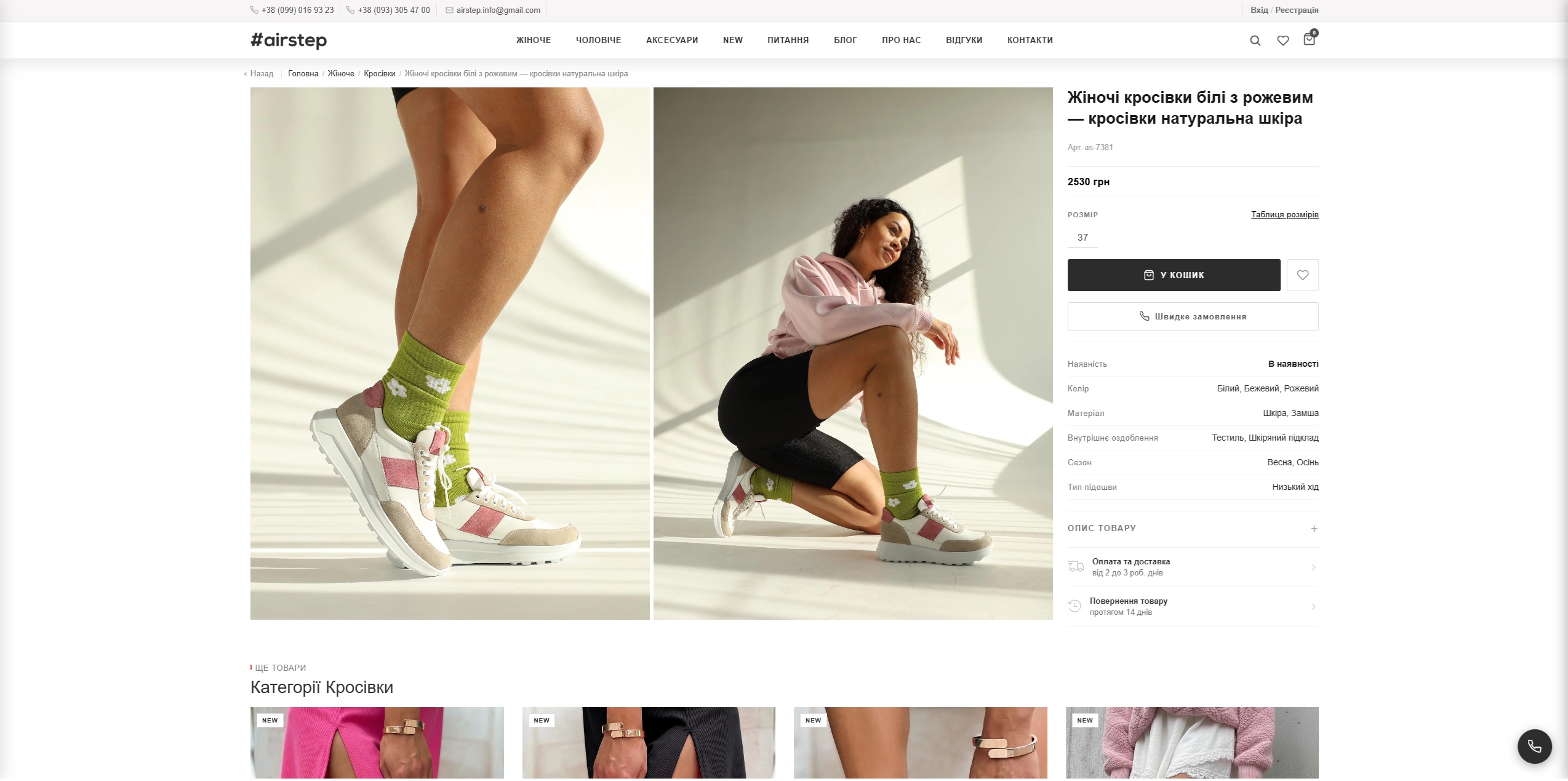
The store frontend is built on Django template server-side rendering with minimal JavaScript (vanilla JS, no frameworks). This provides:
- Blazing-fast First Contentful Paint
- Complete control over SEO and structured data
- Minimal page size
- Full mobile responsiveness
The cart is implemented with localStorage – it works even offline. When a customer starts checkout but does not complete it, the data (phone, name, email, amount) is saved in AbandonedCart. The manager can see abandoned carts in the admin panel and contact the customer.
There are also Availability Notifications – if a product is out of stock, the customer can subscribe to notifications. When the product appears after synchronization, the customer receives a notification.
Security: CSP, HSTS and Content Sanitization
Security in e-commerce is not optional – it is mandatory. We implemented:
- Content Security Policy (CSP) – whitelist of allowed domains for scripts, styles, and images. XSS attack protection
- HSTS for one year – the browser remembers that the site only works over HTTPS
- Clickjacking protection –
frame-ancestors 'none', the site cannot be embedded in an iframe - Permissions Policy – geolocation, camera, microphone disabled (not needed for a store)
CSS Pipeline and Frontend Optimization
9 CSS modules pass through the pipeline: PostCSS → autoprefixer → PurgeCSS → minification. The result:
- Dev: ~143 KB → Prod: ~107 KB (minus 25%)
- PurgeCSS removes unused styles, but with a safelist regex for dynamic classes (swiper-*, animate__*, pc-*)
- Nginx gzip_static – pre-compressed .gz files are served without CPU overhead for real-time compression
- 30-day immutable cache for static assets – with versioned hashes for cache busting
Zero-Downtime Deployment
A store must be available 24/7 – any downtime means lost orders. We configured:
- Systemd + Gunicorn with graceful reload (HUP signal) – new workers start while old ones finish current requests
- Auto-restart on crashes – 5-second delay, up to 10 restarts within 5 minutes
- OOM protection – OOMScoreAdjust=-500, the Linux kernel will kill Gunicorn last
- Nginx serves static files directly, without loading Django
Analytics Without Google Analytics
Instead of third-party tracking, we built our own analytics system:
- SearchQuery – search query logging with normalization. The manager can see what customers are searching for and mark "popular" queries for display on the homepage
- ProductActivityLog – audit of all product changes with JSON diffs (who, when, what changed)
- AnalyticsEvent – view, search, add-to-cart, purchase events. Enough to understand the funnel without third-party scripts slowing down the site
IndexNow: Instant Change Indexing
Batch submission of up to 10,000 URLs per request. Implemented using pure urllib.request – no external dependencies.
Key Results
After launching the platform, Airstep gained:
Automation instead of manual work. Previously, the manager manually added products, uploaded photos, and wrote descriptions. Now synchronization with 4 suppliers happens automatically. AI generates descriptions. Images convert automatically. The manager focuses on business, not routine tasks.
4,242 products in the catalog. Of these, 3,842 are in stock. 73 categories. Everything syncs daily without human involvement.
Instant search. Customers find products even with typos in their queries. Search conversion is significantly higher than with standard SQL search.
Transparent pricing. The manager sees the supplier price, markup, and promotions – all in one interface. No Excel spreadsheets needed.
Zero downtime. Code updates, synchronization, AI generation – everything works without stopping the store.
You can view the project page with technical details in our portfolio – the Airstep case study.
Conclusion: When You Need a Custom E-Commerce Platform
Ready-made platforms cover typical use cases. But there are situations where they fall short:
- Multiple suppliers with different data formats and pricing rules
- Need for AI automation – content generation, translations, SEO optimization at scale of thousands of products
- Specific business logic – per-supplier markup, abandoned cart recovery, availability notifications
- Full SEO control – structured data, Core Web Vitals, meta tags for every product
- Scaling without platform limitations – no limits on products, categories, or API requests
If you recognized your situation – submit your request. We will provide a free consultation, analyze your business, and honestly tell you whether you need custom development or whether a ready-made solution will work. You can estimate the cost using our online calculator.
Need an online store with non-standard functionality? Order turnkey e-commerce development – from $2,500, delivery in 4–8 weeks.
Learn more about our turnkey development services and completed projects.
FAQ
How long does it take to build an online store from scratch?
Depends on complexity. Basic store – 4-6 weeks. Store with custom CMS, supplier sync and AI features (like the Airstep case) – 2-3 months. At Artbrain, we show the first working prototype within 2 weeks.
What are AI product descriptions and why are they needed?
AI generates unique product descriptions based on specifications, photos, and supplier data. This solves the duplicate content problem (when all stores have identical supplier descriptions). Unique descriptions improve SEO and help Google distinguish your store from competitors.
How does supplier synchronization work?
The system automatically receives catalogs from suppliers (via API, XML feeds, or parsing), updates prices, stock levels, and specifications. In the Airstep case, we synchronized 4 suppliers and 6,700+ products in real time. This eliminates manual work and errors.