Imagine a large organization with a complex structure. Every day, employees start work, leave for assignments, take sick leave, return from vacation, or move between departments. Each change affects the timetable, documents, and reports. When every department keeps a separate Excel file, duplicate records, different formats, and several versions of the same data appear quickly.
This was the situation when a large organization with a multi-level structure (under NDA) approached our team. Employee records were split across spreadsheets and documents, while consolidated data had to be assembled manually. The organization needed a single system that could support a complex hierarchy, work in real time, and meet strict data security requirements.
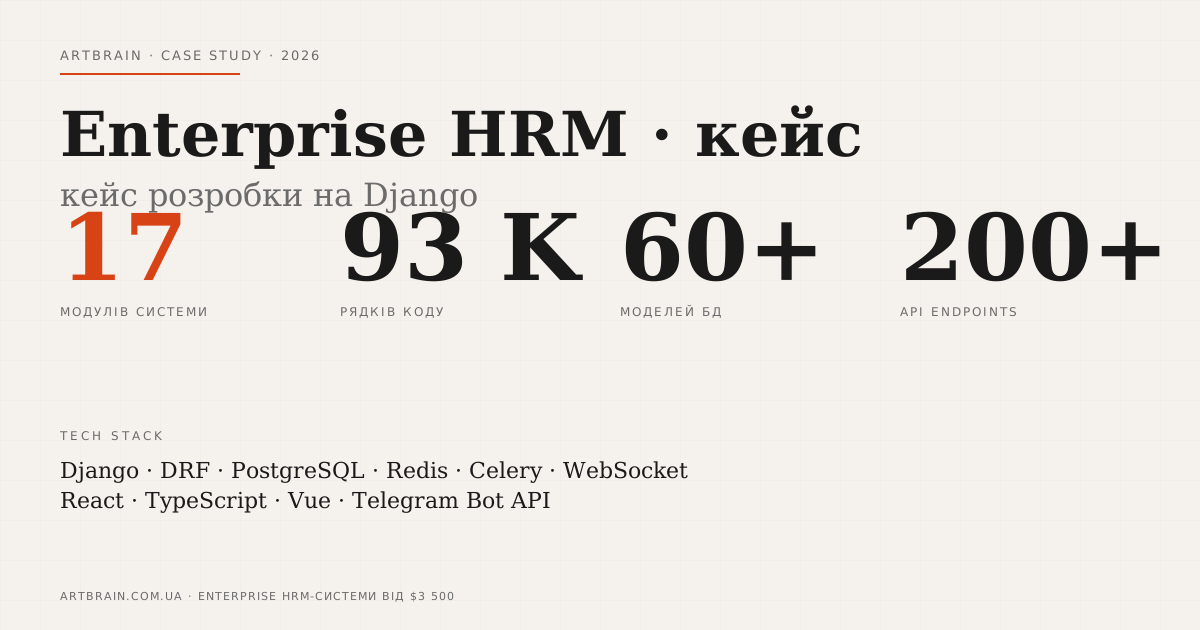
The result was an Enterprise HRM system: 17 functional modules, about 93,000 lines of code, 60+ data models, and 200+ API endpoints. It is a working platform for daily employee records, documents, statuses, and access control.
Technical details are available in the Enterprise HRM case study. If you need to automate your own HR processes, see our HRM system development service.
Below we explain how the system is structured, which modules replaced manual operations, and what the architecture had to account for.
The Challenge: Why Excel Does Not Work at Large Scale
Spreadsheets can be enough for a small team. In a large structure with many departments, they create constant manual work. At the start of the project, we found several recurring problems.
No single database. Each department maintained records separately. Data was duplicated, conflicted, and became outdated. To prepare a consolidated report, staff had to collect files and reconcile differences by hand.
The timetable was difficult to maintain. Employee statuses change every day, and each missed mark affects documents and summary reports. Manual input required repeated checks and did not provide a reliable link to HR events.
Document workflows depended on copying. Reports, certificates, and internal forms were created from previous files. It was easy to carry outdated details or another employee record into a new document.
There was no complete change history. A spreadsheet does not clearly show who updated a record, when it happened, or what the previous value was. Finding the source of an error often took longer than correcting it.
Data security requirements were high. The organization needed database-level isolation, role-based access, and action auditing. Files in local folders or messengers could not provide that control.
With this set of requirements, custom development was the practical choice. The system had to follow the processes of the organization instead of forcing those processes into a fixed product model.
What We Built: An Overview of the HRM System
The core stack is Django REST Framework on the backend, React + TypeScript on the frontend, and PostgreSQL with Row-Level Security for data storage. WebSocket delivers updates in real time. The platform uses a modular architecture, so individual processes can evolve without rebuilding the entire system. We explain the technology choice in more detail in why we use Django.
The following seven modules and technical decisions best show how the platform works.
1. Organizational Structure
Instead of fixed levels such as department, division, group, and team, we built a flexible tree with unlimited depth. django-mptt handles the hierarchy. An administrator can add department types, move branches, and change reporting lines without code changes.
Each tree node is connected to positions, position categories, and employees. React Flow helps display complex relationships in the interface. This model does not lock the organization into one scheme and supports structural changes within the system.
2. Timetable for a Large Structure
The timetable combines daily employee statuses: working on site, on assignment, on sick leave, on vacation, or in training. Staff need to review, edit, filter, and reuse this data in reports.
The interface displays the required part of the timetable, while PostgreSQL stores the data and a dedicated API module provides access. Excel export is available for further work.
The timetable can be filled automatically through mapping rules. When an administrator changes an employee status, the system adds the corresponding mark. A single event does not have to be entered again in several places.
3. EAV Field and Status Builder
The employee card differs by department and process. To avoid releasing code for every new field, we implemented an EAV builder. An administrator creates text, number, date, dropdown, and multi-select fields through the interface.
Statuses work on the same principle. A new status can have a name, color, role availability, and a timetable mapping. The change becomes available without a separate backend update.
A condition builder handles dependent scenarios. For example, an assignment status changes the timetable mark, updates a related field, and sends a notification to the responsible manager.
4. Document Generation from Templates
The system creates DOCX documents from prepared templates and database records. A report, certificate, or internal form receives current details without manual copying. Registries can also be exported to Excel.
The operator uses the same data in the employee card, timetable, and documents. This is an example of automation that removes duplicate actions from daily work.
5. Operations Log and Drag-and-Drop Report Builder
The operations log is connected to a report builder. A user assembles a form from text fields, database tables, signatures, and timestamps. Blocks move through drag-and-drop, and the completed report is stored with its action history.
6. WhatsApp Bot and Google Sheets
The WhatsApp bot sends work messages, reminders, and status change notifications. Google Sheets synchronization supports departments that still use spreadsheets: the system sends current data and accepts approved updates without manual transfer.
7. Admin Panel with Monitoring
A separate panel shows active WebSocket connections, the action log, and role settings. About 30 granular permissions control access to modules, operations, and individual data sets.
Technical Challenges: Ensuring Scale and Security
Building a large-scale system for a large organization requires more than adding forms. It needs clear module boundaries, controlled data access, and predictable interface behavior. The main challenges involved the size of the data model, synchronization, and isolation.
Performance with Large Data Sets
17 modules, 60+ data models, and 200+ API endpoints cannot be maintained as one large block. We separated requests by functional area and limited record access through role context and the relevant branch of the organization tree.
django-mptt handles hierarchy operations, PostgreSQL stores relationships and timetable data, and React loads data for the current screen. This division keeps the interface from processing the entire structure for every action.
Real-Time Updates via WebSocket
When an operator changes an employee status, related screens should receive the update without reopening the page. WebSocket sends the event to subscribed clients in real time.
The admin panel shows active connections and the modules they use. This helps the team see system state and investigate synchronization issues.
Three Levels of Data Isolation
Strict data security requirements are part of the architecture. Isolation works at three independent levels:
- Django ORM level: queries are filtered to the part of the structure available to the user.
- Middleware and role level: every operation passes a permission check before business logic runs.
- PostgreSQL RLS level: the database applies an additional row restriction in SQL.
Role-based access, database-level isolation, and action auditing reinforce one another. An error in one layer should not automatically expose data from another department.
Complete Action Audit
Every significant change enters the log: who performed the action, when it happened, what value existed before the change, and what value replaced it. The history can be reviewed without searching for file copies or messages between employees.
Key Results: What Changed for the Client
After implementation, the organization had one working environment for employee data and related operations.
One database replaced scattered files. Consolidated reports use current records. Departments no longer have to merge separate spreadsheet versions manually.
The timetable follows configured rules. Employee statuses connect to marks, so one change appears in the required parts of the system.
Documents use current data. Templates receive details from the database, and registries are available through Excel export.
Access and actions are controlled. About 30 permissions, three levels of data isolation, and the change log show who worked with each record.
The structure changes without code updates. An administrator manages the department tree, fields, statuses, and rules through builders.
Updates arrive in real time. WebSocket synchronizes related screens, while integrations pass data to external work tools.
Additional technical details are available in the Enterprise HRM portfolio case.
Conclusion: When You Need a Custom HRM System
An off-the-shelf HRM platform works well for standard processes. A custom system is useful when structure, access rules, and document workflows do not fit a predefined model.
- Complex organizational structure with a multi-level tree and different rules for departments
- Strict data security requirements, including role-based access, action auditing, and database-level isolation
- Internal business processes that require flexible fields, statuses, and scenarios
- Integrations with internal systems, messengers, spreadsheets, and documents
- Frequent structural changes that an administrator must make without developer involvement
If these conditions match your situation, start by documenting roles, the department tree, and current data sources. That provides enough material to define the first version and check whether custom development is the right approach.
At Artbrain, we build HRM systems, CRM, ERP, and other automation tools. If a ready-made product does not cover your process, describe the task, and we will review the requirements for structure, access, and integrations.
See also custom business system development, our development services, and completed projects.
FAQ
How much does HRM system development cost?
Basic HRM with employee records, leave management, and payroll – from $3,500. A large-scale enterprise system with 17 modules like our case (93K LOC, 60+ data models) is scoped individually after a brief. Price depends on the number of modules, integrations, and load requirements.
Can an HRM system handle a large number of users?
Yes, with proper architecture. Our enterprise HRM system has 93K lines of code, 60+ data models, 200+ API endpoints, and real-time updates via WebSocket. The key – Django + PostgreSQL provide scalability, and React delivers a fast interface.
What modules are needed for an HRM system?
Basic: personnel records, organizational structure, leave management, payroll. Extended: KPI metrics, recruiting, training, timesheets, document management, staffing tables. Modules are added gradually without rewriting existing code.