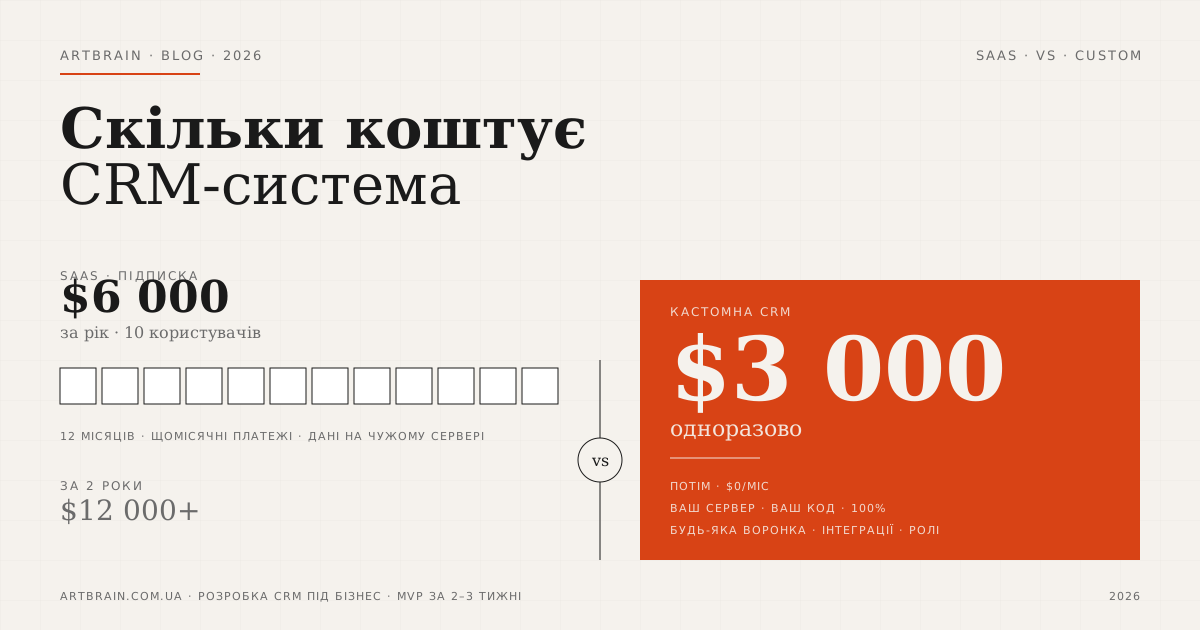
Every time someone asks "how much does a CRM system cost?", there's a temptation to give one clear number. But the reality is different: the cost depends on what type of system you choose. SaaS subscription — from $0 to $50 per user per month. custom CRM development — from $3,000 for development. At first glance, SaaS seems cheaper. But let's do the math: a team of 10 at $50/month costs $6,000 per year. Over two years — $12,000. For a custom CRM, budget separately for development, support after the included period, and connected service fees. Include these costs over the same period to make a fair comparison.
A subscription usually costs less for a small team with a standard sales process that needs a quick start. For a larger team, unusual workflows or accounting integrations, compare total costs with a custom Artbrain CRM starting at $3,000 to build. Budget separately for support after the included period and any third-party services.
This is a cost and selection guide. If you need a CRM built for your process, see the service page: custom CRM development.
But price is not the only factor. Off-the-shelf SaaS works well for standard processes, but has limitations: not all fields are customizable, automation only works within the platform's boundaries, and integrations with your phone system or accounting (1C/BAS) are a separate expense. A custom CRM from Artbrain is built specifically for your sales process: any pipeline structure, any fields, integrations with telephony, your website, messengers, and accounting systems. You don't adapt your business to the system — the system adapts to your business.
Both options compared honestly. Real prices, hidden costs, a case study from our own work, and a clear take on when each makes sense.
What Is CRM and Why Does Your Business Need It
CRM (Customer Relationship Management) is a system for managing customer relationships. Simply put: a unified database with all information about clients, deals, tasks, and communications. Instead of scattered Excel spreadsheets, paper notebooks, and messages across different chats — one screen with the full picture.
Who needs CRM:
- Sales teams — pipeline control, deal statuses, call reminders
- Service companies — requests, completion statuses, client contracts
- Agencies and freelancers — project and deadline management
- Businesses with repeat sales — loyalty programs, repeat orders, LTV tracking
If you're managing more than 10 deals simultaneously or have more than 2-3 sales managers — a CRM system is already necessary. Without it, deals simply get lost.
Done the math? Next step: an estimate for your case
A custom CRM starts at $3000 with no monthly fee for each user. After a short brief, we define the scope of work and quote the exact cost.
Estimate my CRMOff-the-Shelf SaaS CRM (Cloud Subscription) — $0 to $50/Month
Cost: from $0 to $50 per user per month
Cloud CRM platforms are ready-made solutions that launch without any development. You register, configure fields and the pipeline, upload contacts — and start working. The entry barrier is minimal.
When a cloud CRM is the right fit:
- Small business with up to 5 managers and a simple sales process
- Standard pipeline without complex automation needs
- No strict requirements for data security or hosting on your own server
- You need to start fast — literally within a day
Limitations they often don't mention:
- Customization is limited by the platform's boundaries — not all fields and logic are configurable
- Integrations with your telephony or accounting (1C/BAS) can cost an additional $500–2,000
- Data is stored on third-party servers — security and compliance concerns
- With 10+ users, monthly subscriptions can exceed $500/month
- Business growth automatically means higher bills
Hidden trap: free plans are marketing. Limited functionality, contact limits, platform branding inside your system. The real cost for a team of 5 is $75–250/month.
Custom CRM Development — from $3,000 Turnkey
Development cost: from $3,000
Custom CRM from Artbrain is a system developed specifically for your business processes. You don't adapt to the platform — the platform is built around you.
What's included in the base CRM from $3,000:
- Client and contact management
- Sales pipeline with any number of stages
- Tasks, reminders, calendar
- Roles and access rights (manager, team lead, admin)
- Basic analytics and reports
- 60 days of post-launch support
Extended CRM ($5,000–8,000) adds:
- IP telephony integration (calls directly from a client card)
- Telegram, Viber, email integration — correspondence stored in the deal card
- Automatic lead capture from your website into CRM
- Accounting and 1C/BAS synchronization
- Complex automation and trigger-based actions
The system is hosted on your server and you own the code. Integrations can transfer agreed data to connected services. Budget separately for support after the included period and third-party service fees; development payments are agreed by milestone.
Want a preliminary estimate? Use our online calculator — results in one minute.
What Affects CRM System Pricing
The cost of a custom CRM depends on several key factors:
- Number of modules — basic CRM (clients + pipeline + tasks) costs less than a multi-department system with advanced analytics
- Number of users — a custom CRM has no per-user fee, but load and access-role requirements affect the scope; SaaS costs depend on the plan
- Integrations — IP telephony, 1C/BAS, Nova Poshta, Google Ads, messengers — each adds to the budget
- Process complexity — simple 3-5 stage pipelines vs. multi-branch workflows across several departments
- UI design — standard admin interface or custom design matching your brand
- Data migration — moving from Excel, an old CRM, or another system
Hidden Costs They Don't Tell You About
Regardless of which CRM you choose, there are costs that are often overlooked when planning a budget:
- Team training — managers need to learn the new system. For custom CRM, we provide onboarding and user guides. For SaaS — that's your responsibility or a paid platform course
- Data migration from Excel — if you have thousands of contacts, moving data is work that costs time or money. Our development process includes migration
- SaaS integrations — connecting your telephony or 1C to a cloud CRM typically requires additional setup or third-party services: $500–2,000
- Support and updates — who fixes bugs after launch? At Artbrain, 60 days of support is included in the price, with an ongoing support agreement available after
- Integration licenses — some API integrations (telephony, SMS services) have their own recurring fees
- SaaS scaling — as your team grows, the bill grows automatically
When SaaS Makes Sense vs. When Custom Wins
Cloud SaaS subscription is a better choice when:
- Team of 1–4 managers with simple, standard processes
- You're testing a niche and not yet ready to invest
- No specific integration or security requirements
- Budget is tight and speed to launch matters more than flexibility
Custom development is more cost-effective when:
- Team of 5+ managers or you plan to grow
- Non-standard sales processes — complex pipelines, multiple business directions, specific lead routing logic
- You need integrations with 1C/BAS, telephony, or internal systems
- Data security is critical — the system must be on your own server
- Your SaaS subscription already costs $200–300/month — compare its total cost with developing and operating your own CRM
Not sure which way to go? Request a free audit. We'll analyze your processes and tell you which option fits your situation best.
Real Example: Enterprise HRM/CRM
One of our largest projects — an enterprise HRM/CRM platform. This is enterprise level: HRM and CRM combined in one platform for a large organization with multiple departments.
Project scale:
- ~93,000 lines of code across 452 files
- 17 functional modules
- 80+ API ViewSets
- 11 Django apps
- Tech stack: Python/Django (backend), React/TypeScript (frontend), PostgreSQL, Redis, WebSocket for real-time updates
- Integrations: WhatsApp bot, Google Sheets API, DOCX document generation
- Security: 3 layers of data isolation — ORM, Middleware, PostgreSQL RLS
This is not a standard CRM with 3–5 modules. It's a full automation platform that cannot be assembled from off-the-shelf SaaS blocks. Custom development is the only realistic path for requirements like these.
See the details: enterprise HRM system.
How We Build CRM at Artbrain
Our CRM development process follows clearly defined stages:
- Process audit — we analyze current sales flows, communications, and team pain points. Free initial consultation for new clients
- System design — pipeline structure, fields, roles, automations, UI wireframes
- Development — we implement in stages. Each module is reviewed together before moving to the next
- Data migration — moving contacts, deals, and history from Excel or a previous CRM
- Integrations — telephony, email, messengers, website, accounting
- Training — manager and team lead onboarding, user documentation
- Support — 60 days included in the price, ongoing maintenance by agreement
A base CRM version takes 1–2 months. A fully featured CRM takes 2–3 months. Payment is by milestones, as agreed.
Use the cost calculator or request a free audit — we'll help you find the right solution for your business.
Summary
A CRM system in 2026 is not a luxury — it's a tool that solves concrete business problems. Cloud subscription — quick start from $0, but limited flexibility and rising costs as you scale. Custom development from $3,000 gives you ownership of the code and the option to run it on your own server. Add ongoing support and connected service costs to the development budget.
For teams of 5–7 or more, or when your sales process is non-standard, a custom CRM is worth evaluating. Payback depends on development and operating costs, the cost of your current system, and measurable time savings.
Ready to discuss your project? Submit a free consultation request — we'll analyze your processes, find the right fit, and calculate the cost. No obligations.
Also read: CRM, ERP, HRM, WMS: Which Automation System to Choose · Custom CRM Development · Custom HRM Development
FAQ
How much does a CRM system cost in 2026?
For SaaS, include subscriptions, setup, and connected services. A custom CRM budget covers module development, integrations, data migration, and launch; ongoing support and third-party service costs are separate. Compare total costs over the same period. We prepare an exact estimate after reviewing your processes.
How does custom CRM differ from off-the-shelf SaaS?
Off-the-shelf SaaS CRM is a cloud platform with a fixed feature set. Quick to launch, but customization is limited, data is stored on third-party servers, and you pay monthly. Custom CRM is built specifically for your processes: any pipeline structure, any lead routing logic, integrations with your telephony and accounting (1C/BAS). The system runs on your own server, while integrations can transfer agreed data to connected services. There is no per-user fee, but support and third-party services must be budgeted separately. Payback depends on total costs and time savings. Full comparison: artbrain.com.ua/en/crm-systems.
How long does custom CRM development take?
A base CRM version (contacts, pipeline, tasks) takes 1–2 months. A fully featured CRM with integrations (telephony, messengers, accounting) and analytics takes 2–3 months. At Artbrain, each module is reviewed separately. Payment is by milestones, as agreed. For comparison: an off-the-shelf cloud CRM launches faster, but without deep adaptation to your specific processes.
What integrations does a CRM typically need?
The most common CRM integrations: IP telephony — calls directly from a client card, automatic call recording; messengers — Telegram, Viber, WhatsApp, email correspondence stored in the deal card; website and forms — website leads automatically enter CRM as new prospects; accounting and 1C/BAS — invoice, payment, and document synchronization; marketing — tracking lead sources from Google Ads, automatic distribution by campaign. Each integration is a separate module in custom development or an additional configuration step in SaaS.
How do you migrate data from Excel to a new CRM?
Data migration from Excel to CRM is a standard implementation step at Artbrain, included in the development cost. The process: data preparation (deduplication, format standardization), migration script development, test import on a small sample, verification, final migration. If data spans multiple tables or has a complex structure — we provide a preparation template and assist with cleanup. Typical migration time for 1,000–10,000 contacts: 1–3 days. Best done before the system goes live in production. Details: artbrain.com.ua/en/crm-systems.