CRM, ERP, HRM, WMS - four abbreviations that appear in every other article about business automation. But when it comes down to it, most business owners mix these systems up. Someone thinks CRM is the same as ERP. Someone believes WMS is only for large warehouses. And someone just says "I need a system" without being able to explain what exactly they need.
Over 7+ years of building business systems at Artbrain, we have seen dozens of situations where a company chose the wrong system. Spent the budget, time, and team's nerves - only to rebuild everything later. To help you avoid these mistakes, we wrote this guide.
No dry textbook theory here. Just practical information: what each system does, who actually needs it, how much it costs, and how to choose the right one. With real prices and examples from our experience.
CRM - System for Sales and Clients
CRM is the place where all your clients, leads, deals, and communication history live.
Imagine this situation. One manager receives a lead from the website and writes it in a notebook. Another manager talks to a client on the phone and records it in their own Excel file. A third one chats on Telegram but forgets to save the contact. A week later, the client calls again - and nobody remembers they already had a conversation. Sound familiar?
A CRM system solves exactly this problem. All contacts, all communication history, all deals - in one place. A manager opens a client card and sees everything: when they first reached out, what was discussed, what stage the deal is at.
What a Typical CRM Includes
- Client database - unified database with contacts, history, and notes
- Sales funnel - visual board with stages: new lead, in progress, proposal sent, deal closed
- Tasks and reminders - "call client in 3 days", "send proposal by Friday"
- Telephony integration - calls directly from the system, call recording, automatic contact creation
- Messengers - Telegram, WhatsApp, Viber - all messages in one window
- Analytics - number of leads, conversion rate, average deal size, manager performance
Who Needs CRM
CRM is needed by any business that has sales and clients. Even if you have just 2-3 sales managers, CRM already makes sense. But it is especially critical for:
- Sales teams of 3 or more people
- Businesses with long sales cycles (B2B, services, real estate)
- Companies that receive leads from multiple channels (website, ads, social media)
- Service companies where client history matters
Real example: a company came to us with clients tracked in Google Sheets - each manager in their own spreadsheet. When the director wanted to see the big picture, data had to be compiled manually. After CRM implementation, consolidated reports are generated faster, and leads no longer get lost between spreadsheets.
ERP - System for the Entire Business
ERP is one large system that unites all business processes: finance, production, procurement, warehouse, sales, and HR.
If CRM is about clients and sales, then ERP is about the entire business. Think of it as the nervous system of a company, where every department can see what is happening in others.
What a Typical ERP Includes
- Finance module - invoices, payments, budgeting, financial reporting
- Production - planning, quality control, production order management
- Procurement - supplier orders, delivery tracking, price comparison
- Warehouse accounting - stock levels, transfers, inventory counts
- Sales - customer orders, invoices, shipments
- HR module - basic employee records, payroll
- Analytics - consolidated dashboards across all business areas
Who Needs ERP
ERP is not for startups and not for small businesses with 5 employees. It is for companies that have outgrown point solutions:
- Manufacturing companies with a full cycle (from raw material procurement to sales)
- Trading companies with large product catalogs and warehouses
- Companies with 50+ employees where manual data consolidation takes days
- Businesses with multiple offices that need a unified database
Important nuance: you do not need ERP if you have 10 people and sell services. That is like buying a truck to deliver pizza - technically possible, but why? In that case, a CRM and basic accounting will do. We wrote about this and other mistakes in detail in our article about 5 common automation mistakes.
For detailed ERP pricing, comparison of ready-made systems and custom development, and module-by-module cost breakdown – read How Much Does an ERP System Cost in 2026.
HRM - System for Managing People
HRM (Human Resource Management) is a system for personnel management. Everything related to people in your company: from hiring to termination, from time tracking to payroll calculation.
When a company has 10 people, HR tasks are handled ad hoc. Payroll is calculated in Excel, vacations are tracked in a calendar, and new employee onboarding involves a stack of paper forms. But when headcount reaches 50, 100, or 500 - this approach breaks down.
What a Typical HRM Includes
- Employee database - personal cards, documents, contacts, full history
- Time tracking - attendance, shift schedules, overtime
- Leave and sick days - requests, remaining days, automatic approvals
- Payroll calculation - salaries, bonuses, taxes, automatic accrual
- Organizational structure - reporting lines, staffing table
- Document workflow - generating orders, certificates, and reports from templates
Who Needs HRM
- Companies with 50+ employees where manual tracking consumes all of HR's time
- Organizations with complex work schedules (shifts, rotations, night shifts)
- Businesses with high employee turnover that need fast onboarding
- Companies required to maintain accurate time records by law
Example from our practice: we built an HRM system for a large organization. 93,000 lines of code, 17 modules, real-time operation via WebSocket. You can read the full story in our HRM system development case study. It is a large-scale example, but it clearly shows what a professional HRM delivers: full automation of what was previously done manually across dozens of different Excel files.
WMS - System for Warehouse Management
WMS (Warehouse Management System) is a warehouse management system. If you have a physical warehouse with products, this system controls the entire process from receiving to shipping.
When you have few product items, warehouse accounting is simple: goods arrive - record them, ship out - write them off. But when items reach a thousand, returns appear, defects occur, and multiple storage zones emerge - Excel becomes a minefield. One stock balance error, and a customer orders a product that physically does not exist in the warehouse.
What a Typical WMS Includes
- Stock tracking - real balances on every shelf, in every zone
- Receiving - scanning, completeness verification, placement
- Shipping - order picking, routing, packing
- Inventory counts - scheduled and unscheduled, partial and full
- Storage zones - addressed storage, temperature and quarantine zones
- Delivery integration - postal and courier services
- Reporting - turnover, dead stock, ABC analysis
Who Needs WMS
- Online stores with their own warehouse and 500+ product items
- Distributors and wholesale companies
- Manufacturing companies with raw material and finished goods warehouses
- Companies with multiple warehouses or storage zones
- Businesses where stock accuracy is critical (pharmaceuticals, electronics)
Learn more about capabilities and pricing on our WMS systems page.
Comparison Table: CRM vs ERP vs HRM vs WMS
To make the difference easier to understand, here is a summary table:
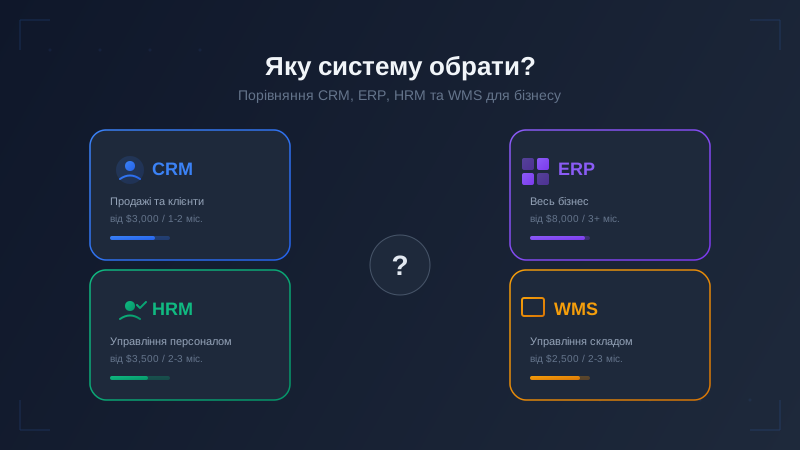
| Criteria | CRM | ERP | HRM | WMS |
|---|---|---|---|---|
| Main purpose | Sales and clients | All business processes | Personnel management | Warehouse management |
| Primary users | Sales department | Entire company | HR, accounting | Warehouse logistics |
| Minimum scale | From 2 managers | From 50 employees | From 50 employees | From 500 product items |
| Development cost | From $3,000 | From $8,000 | From $3,500 | From $2,500 |
| Development time | 1-2 months | 3+ months | 2-3 months | 2-3 months |
| Main pain without system | Lost leads and clients | Chaos between departments | Manual tracking and payroll errors | Stock discrepancies |
| What it gives | Lead visibility | Connected processes | Less manual tracking | Accurate stock |
How to Determine What You Need
Do not start by choosing a system. Start with problems. Write down what hurts the most and see which category it falls into:
You need CRM if:
- Managers lose leads or forget to call clients back
- You do not know how many leads you received last month or where they came from
- There is no single client database - everything is scattered across notebooks, Excel, and messengers
- Management cannot see which deals are in progress or what each manager is working on
You need ERP if:
- You have production or trading with a large product range
- Finance, warehouse, sales, and procurement are tracked in different places and data does not consolidate
- Compiling a company report requires calling 5 departments or merging 5 spreadsheets
- One department does not know what another is doing, leading to errors
You need HRM if:
- The HR manager spends half their time manually filling in spreadsheets and documents
- Payroll calculation takes several days and regularly contains errors
- You cannot quickly answer the question "how many people are on leave today?"
- Onboarding a new employee is a quest involving 10 paper forms
You need WMS if:
- Warehouse stock levels do not match what is in your accounting system
- Order picking takes too long and errors occur
- You do not know exactly where a specific product is located in the warehouse
- Customers receive items they did not order
If your problems span multiple categories, you may need a combination of systems or a full-scale ERP.
When One System Is Not Enough: Combinations
Most businesses need not one system but a combination. And that is perfectly normal. Here are the most popular pairings:
CRM + WMS - a classic for online stores and trading companies. CRM manages clients and orders, WMS handles warehouse and shipments. When a client places an order, WMS automatically creates a picking and shipping task.
CRM + HRM - for service companies with large teams. CRM handles clients while HRM manages internal processes: attendance, payroll, leave. For example, a cleaning company with 200 workers: CRM for orders, HRM for people management.
ERP = all in one - when you need to connect all processes: finance, warehouse, sales, HR, production. An ERP system is essentially CRM + WMS + HRM + finance in a single solution. Suitable for medium and large companies where disconnected systems create more problems than they solve.
Key principle: start with what hurts the most. No need to build everything at once. Implement CRM, see results, then add WMS or HRM modules. Phased implementation costs less and delivers faster results.
How Much It Costs: Real 2026 Prices
Here are current prices for custom business system development:
| System | Cost | Timeline | What is included |
|---|---|---|---|
| CRM | from $3,000 | 1-2 mo. | Client database, funnel, tasks, analytics, integrations |
| WMS | from $2,500 | 2-3 mo. | Stock tracking, receiving, shipping, inventory |
| HRM | from $3,500 | 2-3 mo. | Employee records, attendance, payroll, leave, documents |
| ERP | from $8,000 | 3+ mo. | All of the above + finance, production, reporting |
These are prices for custom development tailored to your business. Not a boxed solution with a bunch of features you will never use, but a system that does exactly what you need. Want to know the exact cost? Use our cost calculator - get an estimate in a minute.
Why custom and not off-the-shelf? Ready-made platforms have their advantages: quick start and low entry price. But there are serious limitations: you pay for features you do not use, adapt to someone else's logic, and cannot change what does not fit. Custom systems are aligned precisely with your processes. More about our development approach in the article 7 reasons to order development from Artbrain.
Common Mistakes When Choosing a System
Over the years, we have seen the same mistakes repeated. Here are the five most common:
1. "We need ERP" - when they actually need CRM. A company with 15 people and a sales team wants "full automation." They start implementing ERP, spend months and thousands of dollars, when all they really needed was a simple CRM with a sales funnel.
2. Implementing everything at once. They want CRM + HRM + WMS + analytics + mobile app in two months. Result: nothing works properly. The right strategy is to start with one system, get it running smoothly, then add the next one.
3. Choosing a system by name, not by needs. A big brand does not guarantee fit for your processes. For a smaller company, an enterprise platform can be excessive: complex, costly to adapt, and slow to implement.
4. Not planning for training. A new system is stressful for the team. Without dedicated time for training and adaptation, people will resist the implementation and continue working the old way. We always include team training in the implementation process.
5. Forgetting about integrations. A system should not work in isolation but in conjunction with other tools: your website, telephony, accounting, email. If you do not think about this during the selection phase, integrations later may cost more than the system itself.
Frequently Asked Questions
Can I start with CRM and later upgrade to ERP?
Yes, and this is the smartest strategy for most businesses. First, implement CRM, get your sales running smoothly, then add warehouse modules, HR tracking, or finance. With custom development, we design the architecture from the start to allow adding modules without rebuilding the entire system.
What is better - an off-the-shelf solution or custom development?
It depends on your needs. For a standard CRM for 3-5 managers, you can try a boxed solution. But if you have unique processes, need specific integrations, or scale beyond 100 users, custom development wins on both price and efficiency in the long run.
How long does implementation take?
Timelines depend on complexity, module count, and integrations. For CRM, the benchmark is: base version — 1-2 months, full version — 2-3 months. Other systems are estimated after the brief and rolled out in stages.
What if I have a small business with 5-10 people?
For small businesses, CRM is the best starting point. Even with a small team, you will feel the difference: fewer lost leads, more control, clear analytics. ERP and HRM are most likely unnecessary at this stage - do not spend your budget on them.
Summary
There is no "best" automation system. There is a system that fits your specific business at its current stage. CRM for sales, ERP for the entire enterprise, HRM for people, WMS for the warehouse. And most importantly - you do not need to implement everything at once. Start with what hurts the most and move forward gradually.
Not sure which system you need? Submit your request for a free consultation – we will analyze your processes and honestly advise what you need and what you can skip for now. No pressure, no hard sell.
Ready to order turnkey business system development? CRM from $3,000 · ERP from $8,000 · HRM from $3,500 · WMS from $2,500. Timeline – from 1 month.
See our completed projects and full list of development services. Already have a website? Check it with our free website checker.
Also read: How Much Does a Website Cost in 2026: Builder, Freelancer or Studio
FAQ
What is the difference between CRM and ERP systems?
CRM (Customer Relationship Management) focuses on customers: sales, pipeline, communications, interaction history. ERP (Enterprise Resource Planning) covers all business processes: finance, inventory, procurement, production, HR. CRM is for the sales team, ERP is for the entire company. CRM starts from $3,000, ERP from $8,000. Small businesses typically start with CRM and add ERP when scaling.
How much does a custom CRM system cost?
The price depends on scope, integrations and timeline. We prepare an exact estimate after a free review of your task.
Which automation system should a small business choose?
If the main process is sales and client communication, start with CRM. If warehouse control is critical, add WMS. HRM is for people operations, while ERP is for broader process management. Do not implement everything at once: start with the process that most needs control.
Can you combine CRM with ERP in one system?
Yes, and it's the most effective approach. Custom development allows combining CRM, ERP, HRM and WMS modules into a single system with a unified database. This eliminates data duplication, simplifies analytics and reduces integration complexity. At Artbrain, we build modular systems: start with CRM, then add ERP, HRM or WMS modules without rewriting code.
What is WMS and who needs it?
WMS (Warehouse Management System) manages warehouse operations: inventory tracking, receiving/shipping, barcodes, stocktaking, multi-warehouse. It is needed by e-commerce stores with large catalogs, wholesale companies, manufacturers with warehousing, and logistics centers. WMS helps control order processing, picking and real-time inventory. Starts from $2,500.