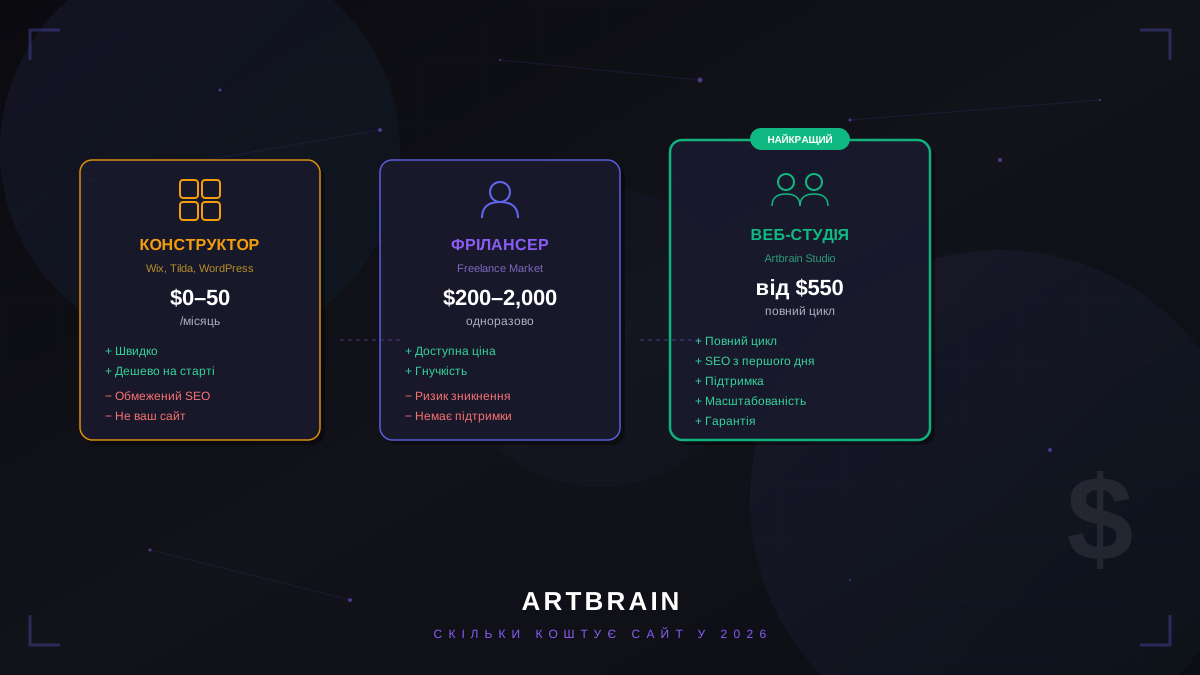
Short answer: as of September 2026, turnkey website development at Artbrain starts at $550 for a landing page delivered in 7-14 days, $1,200 for a 5-15 page corporate website delivered in 3-5 weeks, and $2,500 for an online store delivered in 4-8 weeks. A redesign starts at $1,200 and takes 3-5 weeks, while post-launch support starts at $100 per month. These are starting amounts for an agreed base scope delivered turnkey. At an indicative rate of UAH 44.9 per dollar, this is approximately UAH 24,700 for a landing page, UAH 53,900 for a corporate website or redesign, UAH 112,300 for a store, and UAH 4,500 per month for support. The final cost depends on the number of pages and languages, design, catalog structure, integrations, content readiness, and deadlines. To get a figure for your project, first use the calculator, then complete the brief for a fixed-scope estimate.
How Much a Website Costs: Prices by Type
When a business owner asks how much it costs to create a website, the first step is to define its type. A single page for enquiries, a corporate resource, and an online store require different amounts of work. The starting prices below cover a result that is ready to launch. Hosting and the domain are not included and are paid directly to the provider.
| Type | Starting price | Timeline | Included at a glance | Best fit |
|---|---|---|---|---|
| Landing page | $550 ≈ UAH 24,700 |
7-14 days | Design, development, form, basic SEO, analytics | One service, product, or advertising campaign |
| Corporate website | $1,200 ≈ UAH 53,900 |
3-5 weeks | 5-15 pages, admin panel, SEO, analytics | A company with several services and its own brand |
| Online store | $2,500 ≈ UAH 112,300 |
4-8 weeks | Catalog, cart, account, admin, delivery, CRM | Product sales with order management |
| Redesign | $1,200 ≈ UAH 53,900 |
3-5 weeks | Audit, new design, rebuild, SEO migration | A business with an outdated, slow, or inconvenient website |
| Support | $100/month ≈ UAH 4,500/month |
Monthly | Fixes, updates, and improvements as agreed | A live website that needs regular supervision |
Prices on the site are quoted in US dollars; the UAH equivalent depends on the exchange rate on the day of payment. Hosting and the domain are paid separately and directly to the provider.
What Is Included in the Price
A starting price is useful only when it comes with a list of work. If two quotes use the same project name but one excludes design, analytics, or deployment, comparing only the totals will give the wrong picture.
Landing page from $550
- custom design for the specific offer;
- responsive development for phones, tablets, and computers;
- an enquiry form that sends a message to Telegram;
- basic SEO and Google Analytics connection;
- hosting, SSL, and domain setup;
- 30 days of support after launch.
This option fits a business that needs to explain one offer and collect enquiries. If the project needs separate service pages, news, or regular SEO expansion, a corporate website should be estimated from the start.
Corporate website from $1,200
- 5-15 pages and a custom design based on the brand;
- responsive development and an admin panel for editing texts and news;
- basic SEO optimization and analytics;
- multilingual support when needed, including Ukrainian and English with hreflang;
- hosting, SSL, and domain setup;
- 60 days of support after launch.
This website suits a company with several areas of work, a portfolio, and information that staff need to update without a developer. The $1,200 starting price covers an agreed scope of 5-15 pages, not any website with an unlimited structure.
Online store from $2,500
- a catalog with filters and search, with no limit on product count;
- a cart with promo codes and a customer account;
- an admin panel for products and orders;
- Nova Poshta and CRM integration;
- SEO markup for product pages and sales analytics.
The base price covers a complete store, but data exchange with suppliers, accounting software, or external sales channels is estimated separately. Card payment connection should also be stated explicitly in the brief.
Redesign from $1,200
- an audit of the current website and a new custom design;
- mobile-first development and speed optimization;
- SEO migration that preserves addresses through 301 redirects, meta tags, and canonical links;
- 60 days of support after launch.
A redesign is not just a color change. The estimate must account for the current structure, content volume, old URLs, and functions that cannot be lost during the transition.
Support from $100 per month
The support plan does not require a contract and starts at $100 per month. The regular scope is agreed for the particular website. Any fixes, changes, improvements, and new features are estimated before work begins and completed at $25 per hour. Before taking over a website from another developer, we review its condition and the task free of charge.
For work beyond a standard website, the reference prices are: CRM from $3,000, HRM from $3,500, WMS from $2,500, ERP from $8,000, a Telegram bot from $300, and an AI assistant from $1,500. A mobile app is estimated after the brief.
What Determines Website Development Cost
Number of pages and languages. The work extends beyond building a navigation menu. Every page needs a structure, design, content blocks, metadata, and a mobile version. A second language adds translation, language-specific URLs, a switcher, and technical markup. A landing page and a 15-page corporate website therefore cannot have the same estimate.
Design from scratch or adaptation. A custom layout accounts for the brand, content, and user journey. Adapting an existing structure requires less design work but can limit layout choices and later changes. Before estimation, provide the brand identity and examples of websites that work well not only visually but also logically.
Catalog size. Product count is not limited in the base store, but data structure affects the estimate: attributes, variants, categories, filters, stock sources, and import format. A catalog supplied as a clean table and one assembled from several files and APIs require different preparation effort.
Integrations. Nova Poshta and CRM are included in the base store. Card payment connection, 1C/BAS accounting, sales channels, SMS through TurboSMS, or non-standard data exchange add separate workflows, checks, and error handling. A service name alone does not determine the price. The estimate needs a list of data and the direction of exchange.
Content. When texts, photos, specifications, and translations are ready at the start, the team can build pages immediately. When materials need to be structured, migrated from an old website, or approved in parts, both the budget and schedule change. The brief should separate content supplied by the client from content prepared by the contractor.
Deadline. A realistic schedule includes design, approval, development, content entry, testing, and launch. A shorter deadline changes the work sequence and requires people to be available for fast approvals. The desired launch date should be stated before estimation, not after the estimate is approved.
What Increases the Price
The figures below are actual additions from the Artbrain calculator. They show the cost order for functions within a particular project type, but do not replace a compatibility review of the requirements.
| Function | Project type | Addition |
|---|---|---|
| Second website language | Landing page | +$150 |
| Calculator or configurator | Landing page | +$250 |
| Online booking with Google Calendar | Landing or corporate website | +$250 |
| Card payment connection | Online store | +$250 |
| 1C / BAS / Dilovod integration | Online store | +$450 |
| Marketplace export | Online store | +$300 |
| Customer account with documents | Corporate website | +$500 |
| CMS or admin panel for editing | Redesign | +$350 |
These additions should not be mechanically added to every base price. For example, an admin panel is already included in a corporate website but is a separate redesign option when the old website has no panel or needs a replacement.
Examples from Practice
DOGMA. A corporate website for a window and door manufacturer with a catalog, work portfolio, Django admin panel, and Ukrainian and English versions. Its type is a corporate website from $1,200, while the exact estimate depends on the catalog structure, languages, and content entry method.
ZHNYV-AGRO. An agricultural machinery catalog with about 219 products. The data was migrated from the old site to Next.js, redirects were preserved, Ukrainian and English versions were built, and a custom CMS was added. This is an online store or large catalog starting from $2,500, with migration scoped separately.
Airstep. A Django footwear store with more than 6,700 products and four suppliers whose data is synchronized automatically. It belongs to the online store category starting from $2,500, while catalog scale and exchange with several sources affect the final estimate.
Novavroda. An online health-products store that has operated since July 23, 2026. The owner manages the catalog and homepage directly. This is an online store from $2,500 where the admin panel serves daily assortment management rather than being a nominal feature.
Instynkt Sontsia. A medical-center website with a CMS, mini CRM, online booking, and migration of more than 800 URLs. The foundation is a corporate website from $1,200, while booking, CRM modules, and the large SEO migration form additional scope after the brief.
Calculate the cost in one minute
Select the project type and required functions. For a fixed-scope estimate, send a short description of the task.
Calculate the cost in one minute Get an estimateWebsite Builder, Freelancer, or Studio
A website builder is suitable for a temporary page, demand testing, or a simple business presence when a ready-made template covers the task. Check recurring fees, custom domain support, data access, SEO settings, and migration options in advance. The main risk is not the tool itself but dependence on platform rules and functional limits. The code usually cannot be taken away and deployed independently.
A freelancer can be the right contractor for a small, clearly described task. Before starting, document who owns the code and layouts, where the repository is stored, what testing includes, and who responds after launch. Risk increases when one person must cover design, development, SEO, server work, and support while the project handover process remains undefined.
A studio is appropriate when the website has several page types, integrations, migration, or ongoing development. The estimate should show the stages, the result of each stage, code ownership, warranty support, and the price of later changes. Studio status alone does not guarantee quality, so review live work in the portfolio, the team composition, and the contract terms.
Compare the same scope, not contractor labels. If one quote includes design, responsive development, basic SEO, analytics, launch, and support while another includes only template setup, the price difference reflects different deliverables.
How Long Website Development Takes
A landing page takes 7-14 days, a 5-15 page corporate website takes 3-5 weeks, an online store takes 4-8 weeks, and a redesign takes 3-5 weeks. These are working ranges for an agreed scope, not a promise to launch any project by a fixed date.
New requirements after design approval, delayed texts and photos, complex migration, non-standard integrations, and long approval cycles extend the schedule. At the start, the business should appoint one person to consolidate feedback and define which materials must be ready for each stage. Timelines for mobile apps and systems are set after the brief because their base prices do not describe one standard scope.
Costs After Launch
Hosting costs approximately $10-30 per month based on market rates, a domain costs approximately $5-50 per year based on market rates, and SSL can be free. These payments are not part of the development price. The owner pays the provider directly and keeps access to the account. The specific plan depends on traffic, file volume, and server requirements.
Website support starts at $100 per month without a contract, with the scope agreed for the particular website. Any fixes, changes, improvements, and new features cost $25 per hour after the estimate is agreed. Before taking over a website from another developer, we review its condition, the task, required fixes, and their cost free of charge. For a detailed guide to the budget for an existing website, read How Much Website Maintenance Costs.
How to Get an Exact Price
Start with the calculator. It uses the same base prices, including $550 for a landing page, $1,200 for a redesign, and $2,500 for an online store, then adds selected functions. The calculation takes about one minute and gives a useful budget reference.
To turn that reference into an estimate, complete the brief. Prepare a page list, example websites with notes on what you like, required integrations, languages, the preferred launch date, and information about content. For a store, add the product source, required filters, delivery rules, card payment connection, and order accounting. For a redesign, provide the current website and the functions that must be preserved.
The team can then verify the boundaries of the base package, separate mandatory work from functions that can be added later, and agree the final price in US dollars. If the description is incomplete, an honest estimate will be a range rather than an arbitrary exact figure.
Prices were checked against Artbrain service pages in September 2026. See project examples in the portfolio.
FAQ
How much does it cost to create a website in 2026?
The price depends on scope, integrations and timeline. We prepare an exact estimate after a free review of your task.
How much does a turnkey website cost?
The price depends on scope, integrations and timeline. We prepare an exact estimate after a free review of your task.
How much does online store development cost?
The price depends on scope, integrations and timeline. We prepare an exact estimate after a free review of your task.
How much does a landing page cost?
The price depends on scope, integrations and timeline. We prepare an exact estimate after a free review of your task.
What determines the price of website development?
The price depends on website type, number of pages and languages, custom design or adaptation of an existing structure, catalog size and complexity, integrations, content readiness, and the required launch date. Features such as card payments, accounting exchange, a customer account, or online booking are added to the base package through an agreed estimate.
How much does website support cost after launch?
The price depends on scope, integrations and timeline. We prepare an exact estimate after a free review of your task.