How much does an ERP system cost? A custom ERP built for your enterprise processes starts at $8,000 for development. Boxed systems and SaaS subscriptions can be a quick start, but often need separate configuration, integrations, and adaptation to real business processes. At Artbrain, we build custom ERP systems from $8,000; exact scope and timeline are agreed after the brief. We roll out in phases – each module is delivered and reviewed separately, with the transition planned around ongoing business operations. This article compares approaches, modules that affect the budget, and our experience building business systems.
Off-the-Shelf ERP vs Custom – Real Cost Comparison
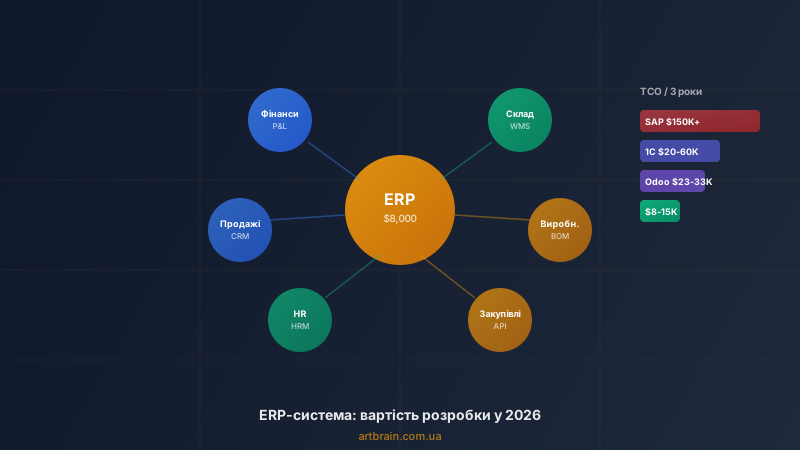
An ERP system is not a one-time purchase – it is a long-term investment. The right comparison is total cost of ownership (TCO) over 3 years. The table compares budget components: licensing or development, implementation, support, and later changes. Calculate them over the same period for your enterprise:
| Criterion | Boxed ERP | Accounting system | SaaS ERP | Custom ERP |
|---|---|---|---|---|
| License / Development | Depends on license | Depends on configuration | Monthly subscription | from $8,000 for development |
| Implementation | Separate budget | Integrator budget | Setup and add-ons | Included in price |
| Monthly fees | Licenses and support | Integrator support | Per-user billing | Support and connected services under their respective agreements |
| 3-year TCO | Depends on licenses | Depends on customizations | Depends on plan | Development + operation + later changes |
| Flexibility | High (expensive) | Medium | Medium | Full |
| Code ownership | No | Partial | No (SaaS) | Yes, 100% |
| Integration with Ukrainian services | Through partners | Available, but outdated | Limited | Any integration built to order |
| Implementation timeline | 6–18 months | 3–12 months | 2–6 months | 2–4 months |
Key takeaway: a custom ERP from Artbrain starts at $8,000; exact scope and timeline are agreed after the brief. You get a system built specifically for your processes. Include post-launch support, connected services, and later changes separately in the TCO calculation.
When off-the-shelf ERP is the right choice
- Corporation with 200+ employees and an IT budget of $100,000+/year
- Standard business processes matching industry templates
- Compliance requirements (SOX, IFRS)
- In-house IT department for maintenance and administration
When custom ERP pays for itself
- Businesses where production, stock, procurement and finance need a shared workflow; team size alone does not decide
- Manufacturing with non-standard processes that don't fit ready-made system templates
- Deep integration needed with Ukrainian services: banking, Nova Poshta, Ukrposhta, tax invoices
- Growing business that needs a system expandable gradually, without full rebuilds
- Data control is important – no dependence on cloud providers
Hidden Costs of Off-the-Shelf ERP
Vendor marketing rarely mentions the full cost picture:
- Customization: ready-made systems often need substantial changes to fit your processes
- Training: the team needs time to adapt to the complex logic of a ready-made product
- Updates: mandatory updates can break your customizations, adding adaptation costs
- Data migration: moving data from Excel or a legacy system is a separate stage that needs advance planning
- Dependency on an integrator: if your 1C integrator goes out of business, you lose support
Custom ERP Module-by-Module Pricing
Custom ERP pricing depends on the module set. You don't need everything at once – we implement in phases, starting with the most critical. We agree the exact cost after a short review of the task.
| Module | What's Included | Cost |
|---|---|---|
| Finance & Accounting | Invoices, payments, AP/AR, P&L, tax documents, bank statements | Included in base |
| Warehouse & Logistics | Receiving, shipping, inventory, minimum stock levels, serial tracking | Included in base |
| Sales & Orders | Quotations, orders, sales funnel, sales analytics | Included in base |
| Procurement | Purchase requests, supplier comparison, contracts, auto-ordering | +$1,000–2,000 |
| Production | BOM, manufacturing orders, capacity planning, quality control | +$2,000–4,000 |
| HR & Payroll | Staffing, time tracking, payroll calculation, leave management | +$1,500–3,000 |
| Analytics & Dashboards | KPIs, charts, consolidated reports, forecasting, management dashboards | +$1,000–2,000 |
| 1C Integration | Document exchange, catalogs, stock levels – automatic sync | +$1,000–2,000 |
| Banking Integration | Automatic bank statement import, payment reconciliation | +$500–1,000 |
| Logistics Integration | Nova Poshta API, shipping labels, tracking, delivery cost calculation | +$500–1,000 |
An ERP system at Artbrain starts at $8,000. Exact scope and timeline are agreed after the brief: they depend on modules, integrations, data migration, and automation depth. See full capabilities on our custom ERP development page.
Who Needs an ERP System
Over 8 years of building business systems, we've found ERP is most needed by five types of enterprises:
Manufacturing
Production planning, raw material tracking, BOM (bill of materials), quality control at every stage. When Excel can't handle hundreds of SKUs and dozens of production orders per week – you need ERP.
Wholesale & Distribution
Multi-location warehouse management, procurement with automatic ordering, regional delivery routing. ERP unifies sales, warehouse, and logistics into one system instead of three separate spreadsheets.
Agriculture & Food Industry
Batch tracking with expiration dates, quality control, tracing the chain from raw materials to finished goods.
Service Companies
Project accounting, resource allocation, financials – from estimation to signed completion act. If managers regularly update spreadsheets by hand, ERP automates routine work and reduces team workload.
E-commerce with Own Warehouse
Online store integrated with warehouse accounting, automatic stock updates across marketplaces, shipping label generation. If you have 500+ SKUs, you're losing money on inventory errors without ERP. For online stores, also see our e-commerce development service.
Development Stages and Timelines
Custom ERP development at Artbrain follows 7 stages. Total timeline: 2–4 months for base configuration, 4–6 months for a complete system.
- Business process audit (1–2 weeks) – free. Interviews with each department: finance, warehouse, sales, production. We document data flows, bottlenecks, and priorities
- System architecture (1–2 weeks). Module selection, connection design, data model, user roles. We align every detail with you
- Base configuration. We build the core: finance, warehouse, sales. Each module is delivered and reviewed separately before moving to the next
- Iterative module development (4–8 weeks). We add production, procurement, HR, analytics – one module at a time. You verify each module before we move to the next
- Integrations (2–3 weeks). We connect accounting software, banking, shipping providers, marketplaces – everything needed for full operation
- Data migration & training (1–2 weeks). We import master data, inventory balances, financial history. Each department gets separate training
- Phased rollout. Go-live by department, parallel running with the legacy system, full transition. First month of support – free
We use a phased approach: the client reviews each module separately, gives feedback before the next stage, and sees the system being assembled around real processes. We applied this approach in projects, including our personnel and time tracking system (17 modules, 93K LOC).
Custom ERP vs 1C:ERP: An Honest Comparison for the Ukrainian Market
1C is the most widespread ERP in Ukraine, so comparison with it is unavoidable. Here is what you need to know:
| Criterion | 1C:ERP | Custom ERP (Artbrain) |
|---|---|---|
| Interface | Outdated and difficult for new users | Modern web interface, responsive design |
| Access | Usually office-only (on-premise) | From any device in a browser |
| Performance | Slows down with large data volumes | PostgreSQL + Redis + Elasticsearch for speed at any scale |
| Specialist dependency | Requires a 1C developer (from $1,500/month) | Support from the system developer |
| Sanctions risk | Russian software with potential business risks | Fully Ukrainian development |
| Integration with modern services | Limited, often through workarounds | REST API for any integration |
If your business already works with 1C and only needs a CRM module, we can integrate a custom CRM with your 1C. If you are ready for a full replacement, a custom ERP can address the limitations of 1C.
How to Choose Between CRM, ERP, and WMS
This is the most common question from clients. The answer is straightforward:
- Need only customer and sales management? → CRM from $3,000
- Need warehouse accounting and logistics? → WMS from $2,500
- Need HR, KPI tracking, payroll? → HRM from $3,500
- Need EVERYTHING – finance, production, warehouse, sales, HR? → ERP from $8,000
For a detailed comparison of all system types, read our article CRM, ERP, HRM, WMS: Which System to Choose.
Common ERP Implementation Mistakes
- Implementing everything at once. Trying to launch all ERP modules simultaneously guarantees chaos. Employees can't adapt, errors multiply, business suffers. Implement in phases: finance and warehouse first, then production, then HR
- Choosing by brand, not by fit. A ready-made enterprise system can be excessive for a smaller manufacturer: expensive, complex, and slow to adapt
- Ignoring data migration. Moving 5 years of history from Excel and legacy systems into a new ERP is a project in itself. Budget time and money for it, or the launch will drag on for months
- Not involving end users. An ERP designed only by the CEO won't be convenient for the warehouse worker or accountant. Each department must test their module before go-live
- Skimping on training. Without proper training, employees bypass the system and revert to old methods. Training investment pays for itself in the first month
More on common automation mistakes in our article 5 Mistakes When Automating Business.
How to Order ERP and Calculate the Cost
Ready to calculate ERP cost for your enterprise? Submit a request for a free consultation. See our ERP system capabilities, portfolio of completed projects, and business system comparison guide.
A production example: what we can build and what changes the estimate
This is an illustrative workflow, not a completed client project. A manufacturer makes products to order. We can connect the steps in a custom ERP for manufacturing so sales staff, production planners and the warehouse work from the same order:
- Order. Sales records the product, quantity and agreed deadline. These details carry through to the production job without being entered again.
- Product specification. The planner defines the materials and quantities needed per item. The order retains its approved version, so a later recipe change does not alter a batch already in production.
- Materials and stock. The system compares demand with available stock, accounts for reservations on other orders and shows what needs purchasing. We agree the reservation rules with warehouse staff.
- Production stage. The person responsible records when an operation starts and finishes, actual material use and rejects. Staff can see where a batch is and what is holding up its next step.
- Batch cost. After completion, the system compares planned and actual costs. We agree how labour, waste and overheads enter that calculation.
For an estimate, prepare an anonymised order, a product specification, a list of operations, a stock record and your current cost calculation. These show whether you need basic production records or equipment capacity planning. Specification variants, work in progress, batch tracking and connections to existing software affect the scope. A first release can cover one agreed path from order to finished goods, with more complex rules estimated separately. To accept that release, run a sample batch and check material consumption, finished stock and the explanation of any difference between planned and actual costs.
FAQ
How much does custom ERP development cost?
The price depends on scope, integrations and timeline. We prepare an exact estimate after a free review of your task.
How is custom ERP different from ready-made systems?
Ready-made ERP offers modules and product logic that are configured for your enterprise. Custom ERP is built around your processes and required integrations, with modules introduced in stages. Compare licensing or development alongside implementation, support, and later changes.
How long does custom ERP implementation take?
ERP timelines depend on module count, integrations, and data migration. We implement in phases: each module is delivered and reviewed separately before moving to the next.
What business is custom ERP suitable for?
Consider custom ERP when production, inventory, sales, and finance need a connected workflow and ready-made software would require substantial adaptation. Standard accounting or a single-department task may only need a ready-made system or a separate module. Start with an analysis of processes and integrations.
How do I calculate ERP cost for my enterprise?
We estimate the cost of ERP after a free review of your task. We agree on the exact price after a short review of your task. For an accurate assessment, submit a request for a free business process audit – we will analyze each department's processes, identify required modules, and calculate cost and implementation timeline.