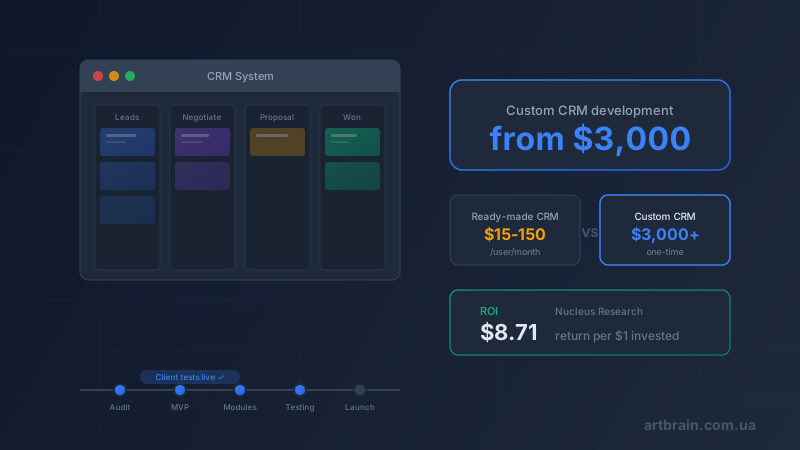
How much does CRM development cost? A custom CRM tailored to your business processes starts at $3,000 as a one-time payment. Ready-made cloud CRMs work as SaaS subscriptions: quick to launch, but limited in flexibility, billed per user, and often requiring separate integration work. This article offers an honest comparison of approaches, a module-by-module price breakdown, realistic development timelines, and phased rollout. A base CRM takes 1–2 months, a full version takes 2–3 months. The final cost depends on modules, integrations, and automation depth – and we will show you how to calculate the budget for your business.
Off-the-Shelf CRM vs Custom Development – An Honest Comparison
Before calculating your budget, it is important to understand that off-the-shelf CRM and custom development are different tools for different tasks. A ready-made system suits standard sales processes; custom development is the right choice when your business operates differently from the template.
| Criterion | Cloud CRM | Industry CRM | Enterprise SaaS | Custom CRM |
|---|---|---|---|---|
| Starting cost | from $50/mo (5 users) | from $15/user/mo | from $45/user/mo | from $3,000 one-time |
| License/subscription for 10 users / year | ~$1,200 | ~$1,800 | ~$5,400 | $0 (no subscription) |
| License/subscription for 10 users / 3 years | ~$3,600 | ~$5,400 | ~$16,200 | $0 (no subscription) |
| Support and hosting / year | Included in subscription | Included in subscription | Included in subscription | support from $100/month (if needed) + hosting |
| Flexibility | Medium | Limited | High (expensive) | Full |
| Integrations | Built-in modules | API + marketplace | 1,000+ integrations | Any, built to order |
| Code ownership | No | No | No | Yes, 100% |
| Vendor lock-in | Full | Full | Full | None |
When an off-the-shelf CRM is the right choice
- A team of up to 5 people with standard sales processes
- Limited budget, need to launch within a week
- No unique business processes that differ from templates
- No plans to scale beyond 20–30 users
When custom CRM pays for itself
- A team of 10+ people – per-user fees of ready-made solutions grow every month
- Unique business processes that don't fit into templates
- Deep integration required with 1C, telephony, warehouse, or other systems
- You need to own the code and not depend on vendor price increases
Hidden costs of off-the-shelf solutions
Marketing for ready-made CRMs rarely mentions the extra costs: customization for your processes, telephony and email integration, team training, and premium features required for real work. In total, the real cost of an off-the-shelf CRM depends not only on the plan, but also on customizations, integrations, and user count.
A CRM built around your sales process
Custom CRM development starts at $3000. We agree on the modules, timeline, and exact cost after a short brief. There is no per-user subscription fee and no restrictions from ready-made plans.
Estimate my CRMOur Approach – Real-Time Development
At Artbrain, we build CRM systems in stages: we align the logic, deliver modules separately, and gather feedback before moving to the next stage.
How it works
- Phased review. Each module is delivered and reviewed separately: not a mockup or a presentation, but working functionality that can be assessed before the next stage
- Every module – together with the client. Before moving to the next module, we demo the completed one and gather feedback. Don't like a button's placement? We change it right away. Need an extra field? We add it on the spot
- Early changes are cheaper. Reworking module logic during development is simpler than changing a finished system. Our approach minimizes the risk of ending up with a system that doesn't match your real processes
- Transparency. The client watches the system grow every week. No "black box" where the developer disappears for a month and then reveals something unexpected
We used this approach when building our enterprise HRM system (17 modules, 93K LOC) – and it proved effective even on large-scale projects.
Module-by-Module Pricing – What Makes Up the Cost
The price of a custom CRM depends on the set of modules. The base configuration includes the system's foundation, while additional modules extend functionality to match your needs. Use our cost calculator for a preliminary estimate.
| Module | What's included | Cost |
|---|---|---|
| Client database & contacts | Client cards, interaction history, tags, filters, import/export | Included in base |
| Sales pipeline | Deal stages, drag & drop, conversion tracking, forecasting | Included in base |
| Tasks & reminders | Planning, deadlines, notifications, Kanban board | Included in base |
| Analytics & dashboards | Sales charts, manager KPIs, reports, period filters | +$500–1,000 |
| Telephony integration | Binotel, Ringostat – inbound/outbound calls, call recording | +$300–500 |
| Accounting integration | Invoice, act, and counterparty synchronization | +$500–800 |
| Email / messenger integration | Telegram, Viber, WhatsApp, Gmail – messaging from CRM | +$300–500 |
| Process automation | Triggers, auto-tasks, automated emails, status changes | +$500–1,500 |
| Mobile version | Responsive interface or PWA for mobile access | +$1,000–2,000 |
A CRM system at Artbrain starts at $3,000. Exact scope and timeline are agreed after the brief: they depend on modules, integrations, and automation depth. See a detailed description of capabilities on our CRM systems page.
CRM Development Stages and Timelines
CRM development at Artbrain follows 7 stages. A base version takes 1–2 months, a full version takes 2–3 months depending on complexity.
- Process audit (1 week) – free. We analyze your current sales processes, client communications, and bottlenecks. We determine which modules you need and which you don't
- Architecture design (1–2 weeks). We create the system architecture, database structure, and interface prototypes. Every screen is approved with you
- Base version. We build the system core: client database, sales pipeline, tasks. Each module is delivered and reviewed separately before moving to the next
- Iterative module development (3–6 weeks). We add analytics, integrations, and automation – one module at a time. You review each module before we move to the next
- Integrations (1–2 weeks). We connect telephony, messengers, accounting software, email – everything needed for full operation
- Team training (2–3 days). We conduct a workshop for your team and prepare video instructions and documentation
- Launch and support. We migrate real data and launch the system into production. The first month of support is free
For comparison: implementing a ready-made cloud CRM with customization for your processes also requires time, separate integrations, and monthly fees on top.
When CRM Delivers Value
The real effect depends on processes, team adoption, and implementation quality. Here is what CRM changes in practice:
- Less routine work. Managers stop spending time manually filling spreadsheets, searching for contacts in messengers, and compiling reports by hand
- Better request processing. No lead gets lost, reminders fire on time, and managers see the complete client history
- Transparency for leadership. The dashboard shows which managers are performing well, where deals are stalling, and what the monthly sales forecast looks like
- Clearer impact measurement. After launch, you can see where the system reduces manager workload and speeds up request processing
Typical example: a team manages leads across messengers and spreadsheets, some requests get lost, and leadership does not see the full picture. CRM brings communication into one place, speeds up request processing, and reduces manager workload.
Common Mistakes When Choosing a CRM
Over 8 years of working with businesses of various scales, we have compiled the typical mistakes that cost companies time and money:
- Choosing based on price rather than process fit. The cheapest CRM is not always the most cost-effective. If the system doesn't match your processes, your team will return to Excel within a month
- Ignoring scalability. A CRM for 5 users and a CRM for 50 are different systems. If you plan to grow, build the architecture with headroom from the start
- Overlooking integration costs. A basic CRM without telephony, email, and messengers is just a fancy spreadsheet. The real value is in communication automation
- Implementing without a process audit. If your processes are chaotic, a CRM won't solve the problem – it will automate the chaos. Audit first, then build the system
- Buying "for future growth." Don't pay for modules you don't need today. A custom CRM lets you add functionality gradually
Read more about choosing between different types of automation systems in our article CRM, ERP, HRM, WMS: Which System to Choose.
How to Order a CRM and Calculate the Cost
The exact cost of a CRM depends on your processes, number of users, and required integrations. We offer a free consultation where we:
- Analyze your current sales processes
- Determine which modules you need and which you don't
- Calculate the exact cost and timeline
- Compare with off-the-shelf solutions – honestly
Ready to calculate the cost of a CRM for your business? Use our cost calculator for a preliminary estimate or submit a request for a free consultation. Check out our CRM system capabilities and our portfolio of completed projects.
FAQ
How much does custom CRM development cost?
The price depends on scope, integrations and timeline. We prepare an exact estimate after a free review of your task.
Which is cheaper – off-the-shelf CRM or custom development?
A ready-made cloud CRM is cheaper upfront, but has monthly billing, customization limits, and separate integration costs. Custom CRM starts from $3,000 one-time, with no per-user fees from us. The right choice depends on processes, user count, and required integrations.
How long does CRM development take?
A base CRM version takes 1–2 months. A fully featured CRM with analytics, integrations, and automation takes 2–3 months. At Artbrain, each module is reviewed separately before moving to the next.
Can I test the CRM during development?
Yes. We implement in stages: each module is demonstrated and reviewed together with the client before proceeding to the next one. This makes it easier to adjust details before the whole system is complete.
How do I calculate CRM cost for my business?
Use the online calculator at artbrain.com.ua/en/calculator for a preliminary estimate. For an accurate assessment, submit a request for a free consultation – we will analyze your sales processes, identify the required modules, and calculate cost and timeline. The first consultation is free with no obligations.