At the end of the day, a manager opens the marketplace account, the website admin panel, and the warehouse spreadsheet. The item has already sold on Rozetka, but the online store still shows it in stock. Meanwhile, another customer places an order on the website. Someone has to call, explain the mistake, and cancel the purchase. When the same thing happens on a marketplace, the cancellation hurts the seller rating. The day ends with a manual reconciliation: someone copies numbers between systems and hopes they will still match in the morning. This is not a store launch problem. It appears later, when the same physical product is sold through a warehouse, a website, and several outside channels. Stock behavior after launch should therefore be designed with the catalog and checkout during online store development.
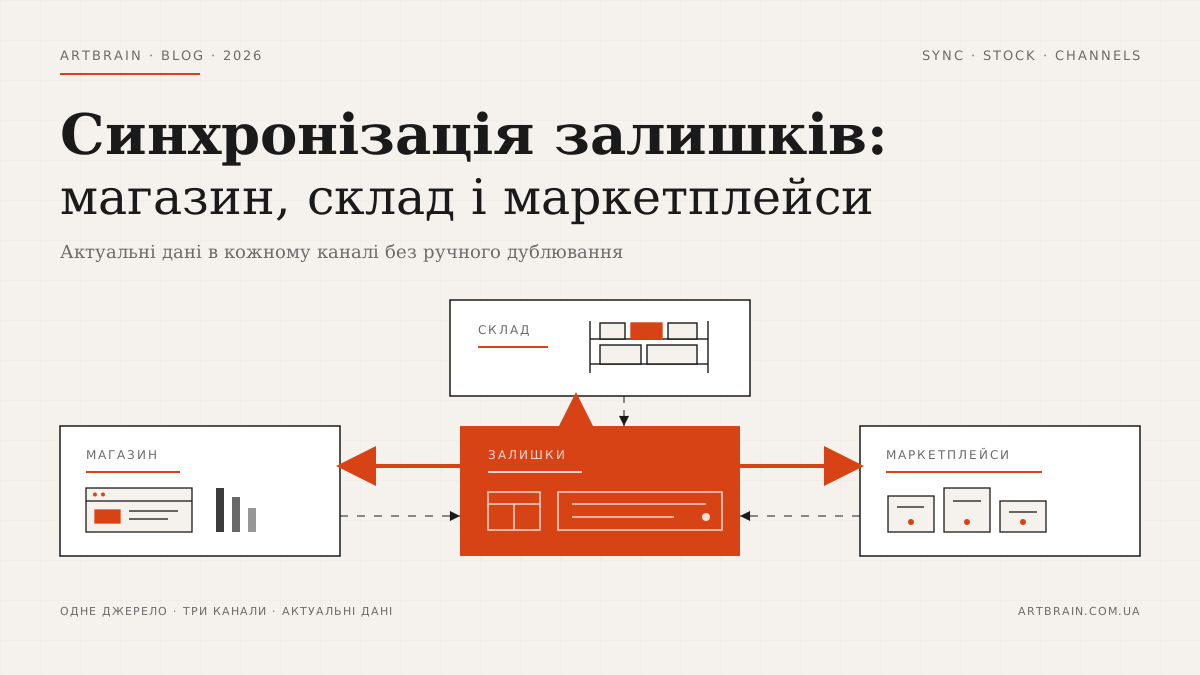
In short: to keep store, warehouse, and marketplace stock aligned, one system must be the single source of truth, while every sales channel only mirrors the quantity available for sale. Active reservations should be deducted from physical stock as soon as an order is created, with a safety buffer for channels where updates may arrive later. A cancelled reservation must be returned only once, returned stock must become available after warehouse inspection rather than when the parcel is received, and manual adjustments must be made in the main system. Send changes as deltas, updating only products whose quantity changed instead of reloading the whole catalog. Webhooks react to events immediately; scheduled polling covers channels that do not send events and catches anything missed. A duplicate message must never deduct the same item twice, so each operation needs a unique identifier. Put outgoing updates in a queue with retries, ensuring a temporarily unavailable marketplace API does not lose the change. Keep a discrepancy log with the expected and actual quantity for each channel. If a ready-made connector cannot follow these rules, the store needs a custom integration.
Where Stock Discrepancies Come From
A stock number rarely becomes wrong because of one large failure. More often, several systems honestly show different states of the same product because they update at different times and interpret “in stock” differently.
- Synchronization runs on an interval. A marketplace has accepted an order, but the next exchange with the website has not started. During that gap, the old number looks current even though the item has sold.
- A reservation is not the same as physical stock. The product is still on the shelf but already belongs to an unfinished order. If a channel sees only the warehouse count, it offers something that is no longer sellable.
- Returns reach stock late. A parcel has come back, but the item has not been checked or released for sale. The reverse also happens: the warehouse accepts the return, while the website never receives that change.
- A manual adjustment stays local. A warehouse worker fixes a picking mismatch, writes off a damaged pair, or finds a missing item, but the correction remains inside the warehouse system.
- An offline sale never reaches the catalog. The last unit sells at a physical point of sale, the checkout records it, and the online channels continue to show availability.
- One product is listed in several places. The website, Rozetka, and Prom.ua all see the same physical unit. Two orders arrive before any channel receives the new balance.
- The supplier follows its own schedule. Its CSV or XML feed updates quantity at a time unrelated to your sales, reservations, and returns. A fresh supplier file can overwrite a newer state from your warehouse.
That is why comparing the final numbers alone does not explain the cause. You need to see the events around them: order, reservation, cancellation, return, offline sale, manual correction, and supplier import.
A discrepancy can hide itself. One channel has not deducted a sale while another has added an unchecked return, so the totals happen to match. A manual check passes although the operations differ. The next event exposes the problem. A working system compares both quantity and the confirmed operations behind it. The manager sees a simple state: free, reserved, awaiting return inspection, or unavailable.
When a ready-made connector cannot keep your stock straight
We design stock synchronization as part of the online store. Development starts at $2500. The Safari Zbroia case is an online store with its catalogue synchronized with 1C.
Estimate my storeThree Ways to Synchronize Stock
Manual CSV/XML Export and Import
This is the least expensive option: a responsible employee exports a warehouse file and uploads it to the website or marketplace. It is reasonable for a small catalog and one channel where orders arrive infrequently. The format is easy to inspect, no separate integration project is required, and a person can find a bad value in the file.
The limit appears as volume grows. A file becomes stale before it is uploaded, different channels expect different structures, and evening reconciliation turns into permanent work. A manual process also cannot block a product that has just been reserved.
Ready-Made Connectors
A connector can be switched on quickly without a separate integration project. For a typical catalog, it moves stock through an available XML feed or API exchange with the website, Rozetka, or Prom.ua. It is a practical choice when the store rules match what the connector provider has already built.
In return for that quick start, you accept its update interval, field mapping, and limits. Your reservation logic, different channel buffers, or an unusual return process may not fit the standard scheme. There is also a subscription for connected channels. Before choosing, calculate not only the technical setup but also the economics of selling through the platform; for Prom.ua, we covered this in our guide to marketplace commission and an independent store.
Custom Integration
It costs more upfront, but the rules follow your process. You can define the main system, the reservation moment, channel priorities, buffers, retry behavior, and the way errors are reviewed. There is no subscription per connected channel, although the integration still needs maintenance when systems on either side change.
A custom exchange makes particular sense when the warehouse already runs in 1C/BAS, a WMS, or a separate accounting system. The work starts with a map of data ownership. The same principle is explained in our article about 1C/BAS and CRM integration: for each entity, the team must know where it is created and who is allowed to change it.
How a Working Stock Sync Is Built
One System Owns the Stock Number
A single source of truth means that one system makes the final change to stock. This is usually the warehouse or accounting layer. The website and marketplaces do not argue with it; they display calculated availability. If operational stock already lives in a WMS system, that system can take this role.
First decide what number to publish. Physical quantity is not suitable for sales by itself. Active reservations and, where needed, a safety buffer are deducted from it. A return is added only after the warehouse confirms the item can be sold again.
The same ownership rule applies to manual changes. A marketplace adjustment must return to the main system as a controlled operation or be prohibited. A cancellation releases stock only after the main system confirms that the reservation exists and remains active. This prevents adding the quantity back twice.
A Reservation Starts with the Order
If stock is deducted only at shipment, the product remains available in other channels between checkout and packing. The reservation should therefore be created with the order. After payment or confirmation, it moves to the next process state; after a valid cancellation, it is released. Order statuses and cancellation rules may live in a CRM system, but that does not make CRM the owner of warehouse quantity.
Send Changes, Not the Entire Catalog
Delta synchronization selects only the items affected by a sale, reservation, receiving operation, return, or correction. It is faster and puts less load on every system than repeatedly uploading the full catalog. A complete exchange is still useful as a control check, but it should not be the only way to react to a sale.
The catalog scale is clear in the Airstep online shoe store case: 6,700+ SKUs, automatic XML imports from 4 suppliers, Django 4.2, PostgreSQL, Meilisearch, and a custom checkout. With several sources, the next supplier feed must not blindly overwrite reservations and local warehouse changes.
Webhooks React, Polling Checks
A webhook works like a notification: a channel says that an order was created or its status changed. It is the right choice for events that need an immediate reaction. Polling works in the other direction: your system asks on a schedule whether new data exists. It is needed when a channel does not send the required event and as a safety check when a notification goes missing.
A Repeated Message Does Not Repeat the Deduction
A network may deliver the same event again, while a system recovering from a delay may not know whether its first attempt succeeded. Idempotency is a simple rule here: the same operation with the same identifier changes stock only once. Without it, a repeated order message looks like a new sale.
A Queue Outlives Channel Downtime
A marketplace API can be temporarily unavailable. The update cannot simply be discarded. It goes into a queue, stays there until delivery succeeds, and failed attempts are retried. At the same time, the system should tell an operator that one channel is behind. Otherwise a technical delay becomes another hidden discrepancy.
The Log Shows Which Channel Is Wrong
A discrepancy log stores the product, expected and actual quantity, channel, time, and related operation. One entry helps fix a particular item. A recurring pattern matters more: perhaps discrepancies appear only after returns or a supplier import. The team can then correct the rule instead of editing the same stock numbers by hand every evening.
What to Do with the Last Unit
The last unit carries the most risk because every channel can see it at once and there is no room for a delayed correction. Use a safety buffer or a stop-selling threshold. The idea is simple: a channel receives physical stock minus reservations and its own buffer. When availability reaches the configured threshold, the channel receives zero and stops accepting orders.
The threshold does not need to be identical everywhere. Your website may confirm a reservation faster, while an outside marketplace may refresh on an interval. Supplier stock needs one rule; a unique item on your own shelf needs another. This is a deliberate trade-off: the store may stop offering an item slightly earlier, but it does not promise the same unit to two customers.
What It Costs and How Long It Takes
There is no honest fixed “stock synchronization” price without a channel map. A narrow scope may connect an existing warehouse to one website. A wider scope covers marketplaces, offline checkout, suppliers, reservations, and returns. The largest scope includes building the system that will own the stock number.
Artbrain's actual starting prices are: WMS from $2,500, an online store from $2,500, and CRM from $3,000. The exchange module is estimated separately after the data flows are described. Duration likewise depends on the number of channels, the quality of SKUs and catalogs, reservation and return rules, exchange options in each system, and the amount of testing. Giving a calendar range before that review would be a guess.
Common Mistakes
- Letting every system edit stock. After the first conflict, nobody knows which number is correct or which change came last.
- Publishing physical quantity without reservations. The item is on the shelf but has already been promised to another customer.
- Relying only on a full import. A large file does not solve the events that happen between two uploads.
- Reserving at shipment. Until then, the website and marketplaces keep selling the same product.
- Ignoring duplicate delivery. A repeated order message deducts quantity again even though no new sale occurred.
- Silently dropping API failures. Without a queue, retries, and an operator alert, the store learns about the failure from a customer.
- Launching without real scenarios. Test cancellation, return, offline sale, the last unit, a repeated event, and a temporarily unavailable channel.
One more mistake is less technical: automating disorder. If the warehouse has no rule for write-offs, returns, and manual adjustments, integration will only distribute conflicting data to every channel faster.
When Stock Sync Is Not Needed
A custom integration is unnecessary for a store with a small catalog, one channel, and infrequent changes. Manual CSV/XML exchange or a regular check can be cheaper and easier to understand. There is no reason to build queues and logs if one person can comfortably control the full product flow.
It is also better to wait while the warehouse process itself is changing. First decide who creates a reservation, when a return becomes sellable again, and where an offline sale is recorded. Automation should follow a repeatable rule, not replace one.
To discuss the task, prepare a list of channels, name the system that currently holds warehouse stock, and show the path of one order from checkout to cancellation or shipment. That map will reveal whether a file or ready-made connector is enough, or whether a custom exchange is justified. We can review the process and outline the scope without rebuilding parts that already work.
A limited first stage when the budget is small
When manual checks no longer suffice, you do not have to rebuild every sales channel at once. We can start, for example, by sending available stock from your inventory system to one online store. Choose the channel whose errors create the most manual work, then check the available connection methods. If an existing connector supports the rules you need, there is no reason to replace it with custom software.
Before estimating, define which system owns stock, which products are in scope, how product codes match and when updates run. If the store already creates reservations in the inventory system, test that path alongside stock updates. Otherwise, sending quantities alone does not prevent double selling: order and reservation handling, or limits on available stock, must also be agreed. Prices and additional marketplaces can wait if they are not needed for the agreed workflow.
The first stage should include a visible log showing the product, channel, last successful update and reason for failure. The person responsible receives an alert, identifies a mismatched product code or unavailable connection, fixes the cause and retries. A retry should send the current quantity rather than apply an old deduction again. Stale data must be marked as stale, not shown as successfully updated.
For an estimate, prepare the inventory software name and version, one priority channel, sample product codes and an example error. We can assess 1C/BAS integration with your online store or repairs to an existing exchange. Acceptance should cover a quantity change, reservation and cancellation, an unknown product code, a temporary channel outage and recovery without a duplicate deduction. This gives a small first stage a testable outcome and clear boundaries.
FAQ
Why do stock levels differ between my website and a marketplace?
Stock drifts when each channel stores its own quantity and updates are delayed, rejected, or mapped to the wrong SKU or variant. Reservations, cancellations, returns, and manual edits may also be handled at different stages. A central stock source plus logged, retryable updates is needed to keep channels aligned.
How often should stock sync between an online store and warehouse?
Stock should update after every event that changes the available quantity: sale, reservation, cancellation, return, receipt, or manual adjustment. A scheduled reconciliation should also compare all channels and correct missed events. Active sales channels should not rely only on periodic full exports.
Is a ready-made connector enough for stock synchronization?
A ready-made connector is usually enough when the systems have stable APIs and the business uses standard product, variant, and warehouse rules. Custom integration is needed for multiple warehouses, bundles, reserved stock, offline sales, unusual SKU mapping, or channel-specific limits. The decision should follow an API and process audit, not the connector feature list alone.
How can I avoid selling the last item on several channels at once?
Available stock must be reserved in one central system before an order is confirmed, with the check and reservation handled as one operation. If several channels request the last item at the same time, only the first successful reservation is accepted; the others receive an out-of-stock response or move to manual review. The new quantity is then published to every channel with retries and duplicate-event protection.
How much does a stock synchronization integration cost?
The price depends on scope, integrations and timeline. We prepare an exact estimate after a free review of your task.