A client comes with a familiar setup: sales managers work in CRM, accounting works in 1C or BAS, warehouse data lives in another place, and leadership receives three different sales numbers every Friday. In CRM the deal is already won, in 1C the invoice has not been created yet, payment arrived at the bank, but the manager finds out only after calling accounting. Then someone manually copies company details, product lines, prices, stock balances, and document numbers. This is where 1C CRM integration stops being a technical wish and becomes a daily operational need. If sales already need a custom CRM from Artbrain, while accounting, stock, or production depends on ERP systems or BAS, these parts have to talk to each other. Otherwise the business has digital tools, but still works through people as a live cable between two systems. A good 1C to CRM integration does not replace accounting and does not force managers to work inside an accounting program. It removes repeatable data exchange: customers, documents, payments, stock, prices, and statuses. Simply put, CRM remains the place for sales, BAS or 1C remains the place for accounting, and between them there is a controlled data flow.
What Really Happens When There Is No Integration
Without integration, the problem is not always visible at the beginning. Everything seems to work: a manager opens a deal, accounting issues an invoice, the client pays, the warehouse ships. But between these actions stand people who move data from one system to another by hand.
The most common scenario is simple. A manager creates a customer in CRM. Then accounting creates the same counterparty in 1C/BAS. If the company name, tax number, phone, or email differs even slightly, duplicates appear. One month later the systems contain three versions of the same company. Which one is correct? Someone has to ask around.
The second pain is documents. An invoice is generated in the accounting system, but the manager does not see its status in CRM. The act is signed, but the deal does not show it. A delivery note exists, but the client receives an old version. Each detail looks small on its own, yet together they take hours every week.
The third problem is stock and prices. A manager sells a product that CRM marks as available, while the real stock has already changed. Or the price was updated in BAS but did not reach CRM. The client receives an incorrect offer, the manager apologizes, accounting recalculates documents. Annoying. More important, avoidable.
The fourth layer is control. Leadership looks at CRM and sees sales. Accounting looks at 1C and sees payments. Warehouse looks at stock. The numbers do not match because each system sees only its own part of the process. Without integration, the real 1C CRM integration is performed by employees.
What a Working 1C/BAS to CRM Integration Looks Like
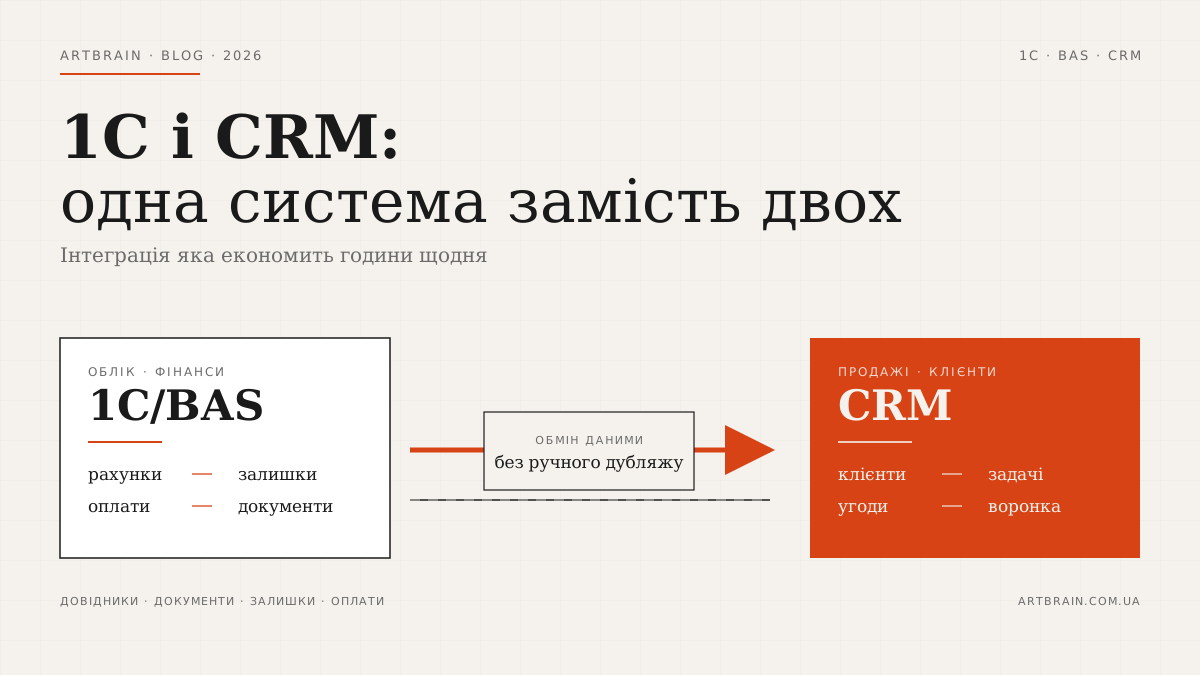
A working integration does not start with a button that synchronizes everything. That is usually the wrong start. First, the company has to define which system is responsible for what. CRM is responsible for leads, deals, communication, sales tasks, pipeline stages, and commercial work. 1C or BAS is responsible for accounting, management reporting, documents, payments, stock, tax processes, and financial records if they live there.
When the roles are clear, BAS CRM integration becomes a set of specific data flows. Not a vague "connect everything", but rules: what is created, where it is edited, who can change it, how errors are handled, what happens with duplicates.
Directories: Customers, Products, Contracts
Directories are the foundation. If customers, products, services, and contracts are not aligned, documents will break too. In our experience, this is where the team should spend serious attention before writing much code.
Counterparties can be created in CRM during the first sales contact, then sent to BAS after company details are checked. Or the official counterparty can be created in the accounting system first, with CRM receiving the verified record for sales work. The right option depends on the company process. The key is to define one master source for each type of data.
Product nomenclature usually lives in BAS because purchasing, stock, cost, units of measure, and accounting logic are there. CRM receives product names, SKUs, current prices, and sometimes price groups. The manager does not retype product lines into an offer. They choose from a current catalog.
Document Flow: Invoices, Acts, Delivery Notes
Documents are the most visible part of integration. The manager works with a deal in CRM and sees whether the invoice exists, whether the act is ready, whether a delivery note has been created. Accounting continues to work in BAS and keeps control over official documents.
A typical flow looks like this: the CRM deal reaches the stage "prepare invoice", the manager checks the items, the system sends data to BAS, BAS creates the document, then returns its number and status to CRM. If the invoice is paid, the manager sees it in the deal card. No call to accounting.
For service companies, acts, contracts, and additional agreements often matter more than delivery notes. For trade, invoices, stock reservations, and shipment statuses matter more. For production, orders, specifications, and fulfillment stages are important. Integration should follow the business process, not a universal diagram from a presentation.
Stock and Prices
Stock should usually not be edited in CRM. That is the zone of the accounting or warehouse system. But CRM has to know what can be sold now, what is reserved, what is expected, and what is not available. Otherwise managers sell blind.
Prices also need rules. Some companies have one base price. Others have several price types, personal terms, currencies, contract discounts, and manager limits. BAS should give CRM the commercial information a manager needs, without flooding the interface with accounting details.
We often see a request to "show all stock across all warehouses". After a short discussion it turns out the manager does not need everything. They need an answer: can I sell this, when will it be available, from which warehouse should it ship? These are different interfaces and a different integration scope.
Payments and Reconciliation
Payments are where integration quickly feels useful. The manager sees whether the invoice is partially or fully paid. Leadership sees not only pipeline value, but also real incoming money. Accounting stops receiving constant questions like "has this client paid?".
Reconciliation is not always needed at the first stage. If the process is simple, it is enough to pass payment statuses and sums by document. If the company has many contracts, partial payments, returns, advances, and credit limits, the integration has to be designed deeper. At that point it moves closer to an ERP system, because CRM should not become accounting software.
4 Levels of Integration Depth
Not every business needs full integration from day one. This is a practical thought, though it is not said often enough. It is usually better to start with a basic exchange, remove manual duplication, and then add deeper scenarios.
Level 1. Basic Directory Exchange
CRM receives customers, products, services, contracts, or part of this data from BAS. Updates run by schedule or by event. This level removes duplicate records and manual creation of the same data in two places.
Level 2. Documents Between CRM and BAS
CRM can initiate an invoice or an order, and BAS returns the number, file, status, and sum. This is already a real 1C to CRM integration because managers stop moving documents manually.
Level 3. Stock, Prices, Payments
The manager sees current commercial information: product availability, prices, payment status, and shipment status. At this level, it is important not to overload CRM. It should show what sales needs, not mirror all accounting data.
Level 4. End-to-End Process
CRM, BAS, website, warehouse, client portal, or service module work as one system. A request becomes a deal, the deal creates a document, payment changes the status, shipment closes a task, and leadership sees a report. This is business system architecture, not just a separate integration.
If you are comparing CRM, ERP, HRM, and WMS as different levels of automation, read our guide CRM, ERP, HRM, WMS: which automation system to choose. It helps draw the line between CRM and a broader operational platform.
How to Prepare for Integration Without Unnecessary Chaos
The best preparation does not start with technical access. It starts with a short process inventory. Take one real deal and follow it from first contact to closure: where the customer was created, when the invoice appeared, who approved the price, where payment was seen, and who gave the go-ahead for shipping or service delivery. This walk-through quickly shows which data CRM actually needs and which information people only want to move “just in case.”
Next, prepare document examples. Not ideal ones, but real ones: an invoice with a standard line item, an invoice with a discount, a partial payment, a completion certificate, a delivery note, a return, a customer with several contracts, and a product that is out of stock. These examples reveal whether a basic exchange is enough or whether you need rules for exceptions. If you test only a simple invoice for one customer, integration can look ready too early.
Directories need separate attention. Before you start, remove obvious duplicate customers, check product codes, establish naming rules, and agree on required fields. You do not have to create a perfect database in one day. But if a product has one SKU in one system and another in the other, integration will not know by itself that they are the same product.
You also need someone responsible on the business side. Not only a 1C developer and not only a sales manager. Someone must make process decisions: what to do with a duplicate, who changes company details, whether an invoice can be created without a contract, and when a payment status is final. Without this owner, integration stalls on small questions that are really business rules.
How Long It Takes and How Much It Costs
In our experience, a typical 1C/BAS to CRM integration takes 2-6 weeks. This is not a promise for every case, but a realistic range for a project with clear directories, documents, permissions, and test exchange. If 1C is heavily customized, there are several databases, non-standard documents, or old workarounds, the timeline can grow.
We do not name a separate module price without a brief because it easily becomes a made-up number. The real Artbrain starting prices are clear: CRM cost starts from $3,000, and ERP cost starts from $8,000. Integration is estimated as part of a specific CRM, ERP, or automation stage.
The budget depends on the type of 1C or BAS, the quality of directories, the number of documents, exchange directions, synchronization frequency, available program interface, access rights, error logs, and test environment. Process discipline matters too. If the company has no single rule for who creates a counterparty and when an invoice is final, integration will not fix that by itself.
Before development, we fix the exchange map: which entities move, in which direction, which system owns each field, and what happens when something fails. This document is often more important than the code because it removes arguments between sales, accounting, and warehouse.
Common Mistakes and How We Avoid Them
The first mistake is trying to synchronize everything. 1C/BAS can contain many service fields, historical directories, old documents, and technical flags. CRM should not become a copy of accounting. It is better to pass less data, but pass what managers actually need.
The second mistake is two-way editing without rules. If a client can be changed in both CRM and BAS, the systems will eventually conflict. Each field needs a source of truth. Company name, tax details, client group, credit limit, and contact person may have different owners.
The third mistake is ignoring exchange errors. Integration should not stay silent. It must show what did not pass and why. For example: product not found, counterparty code incorrect, no permission to create a document, empty price. An event log saves a lot of time.
The fourth mistake is connecting directly to an old customized database without a stable exchange layer. We often use program wrappers, intermediate tables, or a separate exchange service so 1C updates do not break CRM after every change. This matters especially when another contractor supports 1C.
The fifth mistake is launching without real test data. You need practical cases: a simple invoice, partial payment, return, client with two contracts, product without stock, price change. These cases show whether the system is ready for real work, not only for a demo.
What Happens When 1C or BAS Is Updated
1C/BAS updates are a normal part of system life. Trouble starts when integration depends on internal details that change without warning. After an update, the document structure, field name, posting rule, or exchange user permissions can change.
To prevent sales from stopping, integration should use stable exchange rules. In more complex cases, a separate layer sits between CRM and 1C: it accepts data from CRM, checks the format, sends it to BAS, stores the log, and returns the status. If something changes in 1C, we update this layer instead of rewriting the whole CRM.
Permissions are another practical point. Integration should use a separate user with limited rights. It does not need access to everything. It should perform only the actions required for exchange. Data transfer should go through HTTPS, secure keys, logs, and controlled access points. In simple terms, integration should not be an admin password hidden in code.
The actual integration architecture still depends on your configuration, customizations, and business process.
When Integration Is Not Needed
Integration is not needed if you have a few deals per month, one manager, and accounting has no heavy workload. In that case, manual invoice transfer can be cheaper and simpler. There is no reason to automate what does not hurt.
It can also be unnecessary when the process is not stable yet. If today a manager creates the invoice, tomorrow accounting does it, the next day the owner changes it, and product structure changes every week, first fix the rules. Integration likes repeatability.
Another case: the company plans to fully replace its accounting system soon. Then it is better not to invest too much into a deep connection with the old database. A temporary export or basic exchange may be enough, while full integration should be designed after the new platform is chosen.
1C/BAS to CRM integration is needed when manual exchange has already become part of the daily routine. Managers ask about payments, accounting retypes data, warehouse confirms stock, leadership builds reports from several places. At that moment the business pays for missing system connection every day. Not always directly in money. More often in time, mistakes, and lost control.
The right path starts with a process map. Where the customer is created, where the invoice is created, who owns the price, where payment is recorded, what the manager must see. Only after that it makes sense to talk about implementation, scope, and launch. If you need 1C CRM integration without unnecessary noise, Artbrain can design CRM, ERP, or a separate exchange layer so your systems work together, not side by side.
What to prepare for a 1C/BAS and CRM integration estimate
If both systems are already in use, we can estimate connecting them without replacing your CRM or ERP. Our 1C/BAS integration service covers this work. To discuss your particular setup, prepare:
- The configuration name and version of 1C/BAS, your CRM name and any known customisations. We will check connection options for those versions.
- The documents and shared records to exchange, such as customers, products, invoices and payment statuses. Sample structures with personal details removed are enough.
- The direction of transfer for each record type, where it is created and how often it needs updating. If both systems can edit it, we need a rule for conflicting changes.
- The person responsible for investigating errors and an example of the result a salesperson or accountant should see.
We can start with one document type and test its full journey using test data: creation, transfer, failure and retry without a duplicate. Before launch, we will agree how staff are alerted and how exchange resumes when either system is temporarily unavailable. You do not need to send passwords with your first enquiry.
FAQ
How long does 1C/BAS to CRM integration take?
A typical 1C/BAS to CRM integration takes 2-6 weeks. The timeline depends on the 1C or BAS configuration, number of directories and documents, exchange directions, data quality, and whether a test database is available. If the system is heavily customized or has several databases, a short exchange audit should come first.
Is it safe to transfer data from 1C via integration?
Yes, if the integration is designed correctly. Data should be transferred over HTTPS, access should be limited through a separate user, tokens, or secure keys, and permissions should cover only the required actions. Event logs are also needed so the team can see which data was sent or received.
Do we need to pause business during integration?
Usually no. Integration can be prepared and tested while the business keeps working. First, the team sets up test exchange, checks directories, documents, payments, and errors, then the exchange is launched in production mode.
What happens when 1C is updated?
A 1C or BAS update can change fields, documents, or access rights. To prevent this from breaking CRM, integration should use stable exchange rules, program wrappers, or a separate service between systems. Then 1C changes are handled in one layer instead of across the whole CRM.
What is the minimum scope of work?
The minimum practical scope is basic exchange of directories and documents. For example: customers, product nomenclature, invoices, payment statuses, or document statuses. This is often enough to remove manual duplication and check data quality before deeper integration.