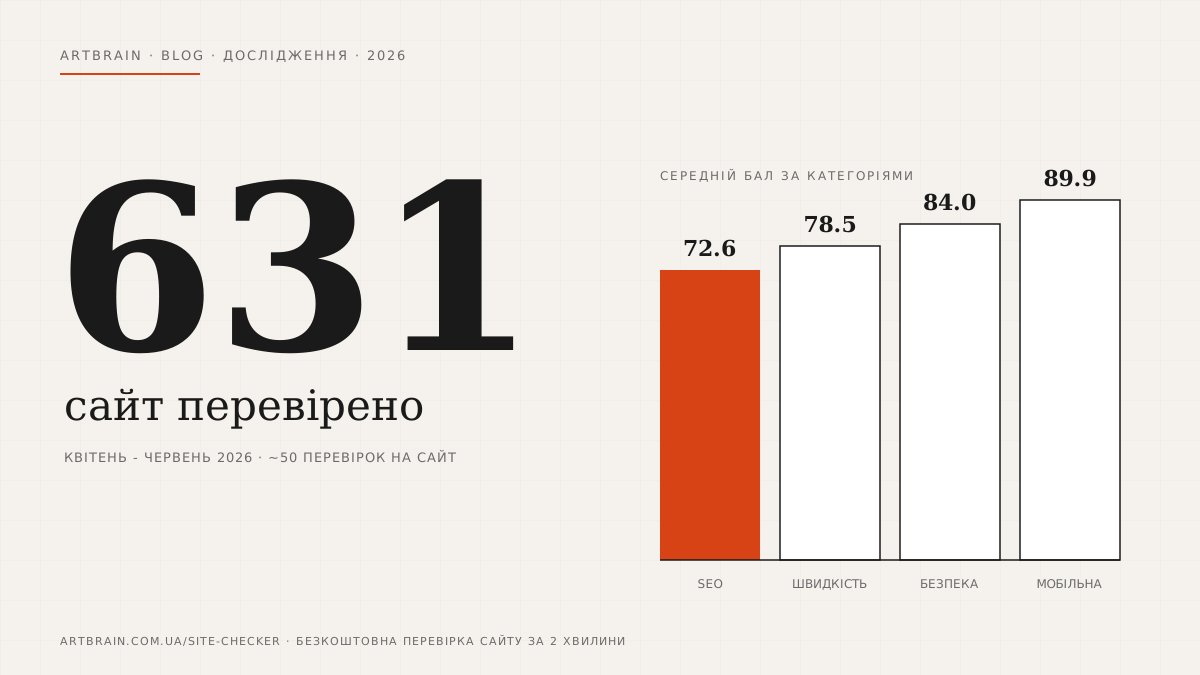
From April to June 2026, people ran 895 checks through our free online website checker. After data cleanup that comes to 631 unique websites, 167 of them in the .ua zone. Here is the main thing the numbers showed.
The median overall site score is 80 out of 100. Sounds decent, but 97% of websites have at least one critical error, and a typical site has 6 failed checks plus 11 warnings at once. The weakest category is SEO: the median here is only 78, and every sixth site scores below 50. The second problem spot is loading speed. For 41% of all sites it turned out to be the worst category, and among .ua sites this share grows to 55%. The mobile version proved to be the most polarized: 77% of sites have it in perfect shape, while 8% have it failed so badly that the score drops below 70. Security looks decent on average (median 84), yet only 22% of sites reach 90 or higher. In this article we break down each category with real numbers and explain what these errors cost a business.
Where the Data Comes From
Our website runs a free website check. You enter an address, and in a couple of minutes the service runs the page through roughly 50 automated checks in four categories: SEO, security, speed, and mobile version. Speed scoring pulls in Google PageSpeed data. Each check gets a status: passed, warning, or critical error, and these add up to a 0 to 100 score per category and an overall site score.
Over 10 weeks, from April 1 to June 10, 2026, people launched 895 checks. We excluded our own domain and service requests from the sample, and when one site was checked several times, we counted only the latest check. That left 631 unique websites. 167 of them operate in the .ua zone, the rest on .com and other zones, because the checker is used not only from Ukraine.
An honest note about the sample. This is not a random slice of the internet: sites get checked by their owners, marketers, and developers, that is, people who have already started thinking about the quality of their resource. The real picture across the whole web is most likely worse than our numbers. One more detail: 79% of checks came from Google search, meaning a person first searched for something like "check my website" and only then landed on our tool.
The Big Picture: a Score of 80 Looks Good Until You Look Inside
The median overall score across all 631 websites is 80 out of 100. There are almost no total disasters: only one site in the entire sample scored below 50. 47% of sites landed in the 50-79 range, and 53% cleared the 80-point bar.
Now the less pleasant part. 97% of websites had at least one critical error. 63% of sites had five or more. A typical site from our sample goes through about 53 checks with this result: 36 passed, 11 warnings, 6 critical failures.
How does a median of 80 coexist with six critical errors per site? The errors are simply distributed unevenly. Sites pass most of the checks, scores stay at a decent level, but the failures concentrate in the same spots: something in basic SEO, something in speed, a couple of security headers. The overall score masks these isolated holes, while they quite literally eat away Google rankings and conversion.
So the situation is not "everything is bad" but rather "almost everyone has a specific list of things to fix". And that list is usually short: 5-7 items that can be closed within a week of work.
Average and median scores by category:
| Category | Average score | Median |
|---|---|---|
| SEO | 72.6 | 78 |
| Speed | 78.5 | 78 |
| Security | 84.0 | 84 |
| Mobile version | 89.9 | 100 |
SEO: the Lowest Scores of All Categories
The average SEO score is 72.6, the median is 78. This is the weakest category in the study. 38% of sites score below 70, and 17% fall below 50. Sites in the .ua zone actually look slightly better here than the overall sample: their median is 83.
What hides behind a low SEO score? The checker looks at the basics: whether the page has a title and a description, whether H1-H3 headings are structured correctly, whether images have alt text, whether there is a sitemap.xml, Schema.org markup, and Open Graph tags for social networks. A separate block covers readiness for AI search, for example the llms.txt file and access for AI search bots.
What this means for a business, in plain words. A site without basic SEO is half-invisible to Google. You pay for ads while the free channel, organic search, simply does not work. If a page without a title and description still makes it into search results, it shows up there as a stub without a name, and people click it less. And since 2026 there is one more factor: AI answers in search cite, first of all, sites with structured content and markup. Those who did not prepare are simply absent from those answers.
Speed: the Main Pain Point of Ukrainian Websites
Across the whole sample the average speed score is 78.5. Every fifth site (20%) does not reach 70. But the most interesting part shows up when you determine the worst category for each individual site. For 41% of all sites it is speed, more often than any other category. Among .ua sites speed turned out to be the worst category in 55% of cases, with a median score of 75 against 78 in the overall sample.
Why this hurts. A slow site loses customers twice. First, some visitors simply close the tab without waiting for the page to load, especially on a phone with mobile internet. Then Google, which factors speed into rankings, hands your positions to faster competitors. For an online store this is direct money: a person with a full cart will not wait while the payment page "thinks".
The good news is that speed gets fixed predictably: compress images, enable caching, remove unnecessary scripts, move the site to decent hosting. It is an engineering task with a measurable result, not magic.
Security: Decent on Average, but the Margin Is Deceptive
Both the average and the median security scores are 84. It looks like the healthiest category, and partly it is: fewer than 2% of sites score below 50. HTTPS became the norm long ago, and almost everyone has the basic level of protection.
But there is a catch: only 22% of sites score 90 or higher. The rest are stuck in the "works, but with no safety margin" zone. The checker verifies more than just the presence of HTTPS: it looks at the http to https redirect, the encryption protocol version, the certificate expiry date, security headers such as HSTS and Content-Security-Policy, and cookie settings. It is exactly on these "second layers" of protection that most sites lose points.
What it means for a business. Security headers sound like a purely technical topic, but they work in a simple way: they are instructions to the browser about what can and cannot happen on your site. Without them it is easier for an attacker to embed third-party code into a page, intercept form data, or replace content. For a site that accepts requests or payments, this is a matter of customer trust. A separate nuisance: an expired certificate that makes the browser show a red "connection is not secure" warning instead of the site. You can write off that day's sales.
Mobile Version: Either All Good or All Broken
The most polarized category. The median is 100 points, and for 77% of sites the mobile version is in full order. Yet 8% of sites score below 70 (among .ua sites it is 10%), which means their mobile version is essentially broken: tiny fonts, elements that do not fit the screen, buttons impossible to tap with a finger.
The paradox is in the behavior of the owners themselves: 72% of checks in our tool were launched from a desktop. People look at their sites on a big monitor, while Google has been evaluating sites primarily by their mobile version for many years, and customers mostly come from phones. If your site is among those 8%, you are showing Google and half of your visitors the worst version of yourself.
What a Site Owner Should Check Right Now
You do not need to be a developer to walk through this list in 15 minutes:
- Open your site from a phone over mobile internet, not Wi-Fi. Count the seconds until you can read and tap buttons. More than three seconds is already a reason to investigate.
- Type your site address starting with http://. If the browser does not automatically redirect you to the secure https version, the redirect is not configured.
- Look at your site in Google results: search for site:yourdomain. If instead of proper titles and descriptions you see chopped-off text, the pages have title and description problems.
- Open yourdomain/sitemap.xml. The sitemap should exist and contain up-to-date pages.
- Scroll the homepage on a phone: check whether the phone number and the contact button are visible without extra effort and whether the layout falls apart.
- Ask whoever built the site when the content management system and plugins were last updated. If the answer is "I do not remember", that is a signal.
- Run the free website check: you will get a full list of ~50 items with statuses and hints on what exactly to fix.
What to Do Next
A separate observation from our data: owners rarely check their sites regularly. 83% of domains in the sample were checked once and never again. Meanwhile the site lives its own life: a content manager uploads a five-megabyte photo, the certificate expires, a system update breaks the layout on phones. A one-time check shows a snapshot of today but does not protect against degradation. So it is worth checking at least once a quarter and always after any noticeable changes to the site.
If after the check you are holding a list with red items, there are three paths. Small things like a missing page description can be fixed on your own or by whoever maintains the site. If you want someone to look at the site with an engineer's eyes and sort the problems by priority, order a website audit: we will analyze not only the automated checks but also structure, content, and conversion. And to keep the site from degrading again (images get heavier, plugins get older, certificates expire), there is ongoing website technical support.
And if the check made you realize it is easier to build a new site than to fix the old one, first read how much a website costs in 2026 and how a corporate website differs from a business card site. This will help you come to a developer with a specific request instead of "make it pretty".
Check your website right now: artbrain.com.ua/site-checker. It is free, requires no registration, and takes about two minutes.
FAQ
What are the most common website problems in 2026?
Based on 631 checked websites, the weakest categories are SEO (median score 78) and loading speed (the worst category for 41% of sites). 97% of websites have at least one critical error.
How can I check my website for errors for free?
Use the free checker at artbrain.com.ua/site-checker: about 50 automated checks of SEO, security, speed, and mobile version in 2 minutes, no registration required.
What website check score is considered normal?
The median score in our study is 80 out of 100. A score below 70 in any category means the problems are already costing you visitors or Google rankings.
Why does a slow website hurt a business?
Some visitors close a slow page without waiting for it to load, and Google ranks slow websites lower in search results. Among .ua websites, speed turned out to be the worst category in 55% of cases.
How many errors does a typical website have?
A typical website from our sample has 6 critical errors and 11 warnings across about 53 checks. 63% of websites have five or more critical errors.