A store owner opens OpenCart to replace a product photo. The admin panel thinks about it. Then thinks some more. The block they need is buried in settings again, while a sales feature that has been on the list for months will not fit the current theme without yet another extension. A developer suggests moving the site, and the answer comes straight back: “We’ll migrate and lose our Google rankings.” It is a familiar fear. Businesses put up with a slow store for years because of it, even though a move does not have to wipe out SEO. There is no magic involved. You need an accurate URL map, correct redirects and a check of every page that matters. That is how we approach online store development and migration.
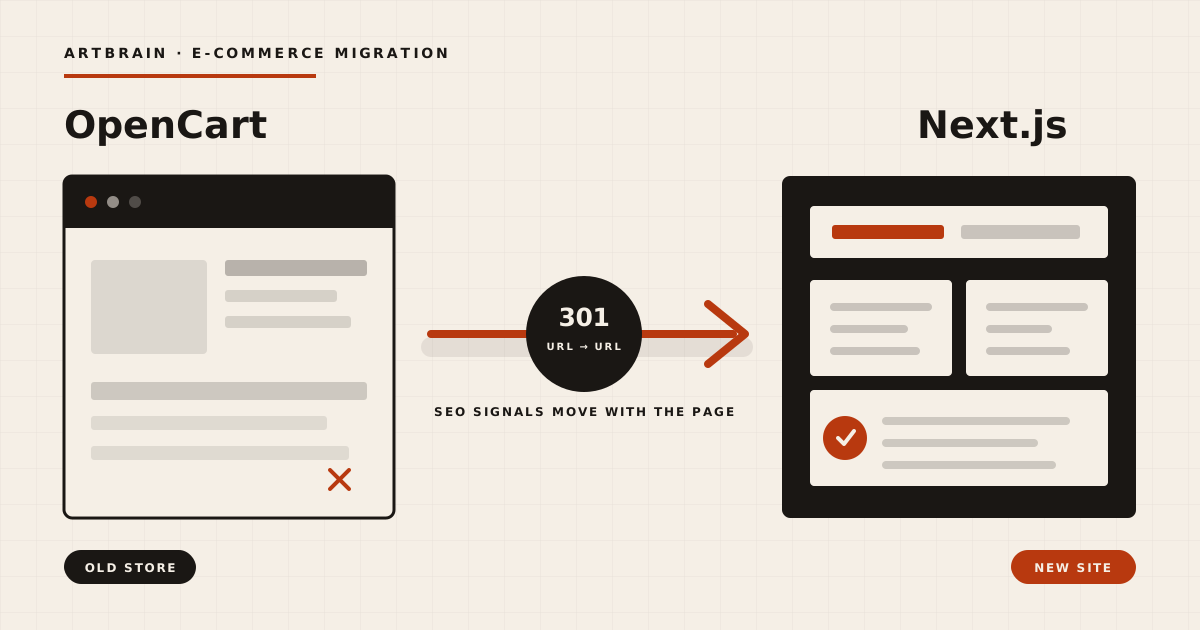
In short: an online store migration moves the catalog, images, content and working features from an old platform to a new site. It is needed when the admin is slow, extensions conflict, the standard theme blocks useful changes or the business has outgrown ready-made flows. SEO can survive the move. Before development, inventory the old addresses, give every valuable page a matching destination and configure a permanent 301 redirect. Move content, metadata, canonicals, internal links and language versions too, then submit a new sitemap and test server responses. Replacing OpenCart with Next.js does not remove rankings by itself. Search engines need each old page to lead clearly to a relevant new version. For ZHNIV-AGRO, we parsed the catalog, mapped the old URLs with 301 redirects and launched separate Ukrainian and English pages. Indexing and organic traffic were preserved. Migrate when the new system solves real operating problems, not merely to put a newer framework on the invoice.
Why a store outgrows a ready-made platform
OpenCart can cover a conventional start perfectly well: products, categories, a cart, orders and a basic admin area. If the business follows that pattern and the website is not getting in the way of sales, rebuilding it just to change the stack would be a waste.
The trouble tends to appear later. One store needs unusual product compatibility rules. Another needs language-specific content. A third needs a catalog without checkout but with a proper lead workflow for managers. Each departure from the standard flow calls for a theme override, an extension or a core change. Eventually a developer has to work out which extension overrides which file before touching the actual task. Even routine upgrades become careful operations because the theme and extensions may not agree with the new version.
Performance is not decided by the technology name in the footer. Database queries, extension count, image handling, caching and the amount of unused code on each page all matter. A ready-made platform has to support a broad set of generic use cases. A custom site can do only what this particular business needs. For ZHNIV-AGRO, that means a showcase catalog with a callback form, not a conventional shop with a cart.
Once the catalog, filters and data sources start growing, another patch is rarely the right foundation. The store needs e-commerce development. At that point, migration clears away accumulated constraints and gives future changes somewhere sensible to live.
A migration that keeps your SEO
If your store has started fighting its platform, the sensible first step is to inspect the catalog and old URLs, without promising a rewrite for technology’s sake. See how we build custom online stores with SEO-safe migrations, then bring us the specific problem. We will tell you plainly whether it is time to move.
Order developmentThe main fear: “We’ll migrate and lose SEO”
Search visibility does not live inside OpenCart. It belongs to pages: their URLs, content, internal and external links, language versions and technical signals. Next.js is not the dangerous part. The danger is an old address suddenly returning 404, pointing to the home page, or passing through a chain of redirects.
That is why a migration does not start with the new design. First, you collect every old address for products, categories, articles and static pages. The list can come from several places: the old sitemap, database, a crawl of the site, Search Console reports and links found on other pages. Technical duplicates are removed, then every useful old URL is assigned one destination. The result is a plain mapping of old page to new page.
Each pair then receives a permanent 301 redirect. This needs to be product to the same product, category to the equivalent category, article to the same article. Sending the entire old catalog to the new catalog landing page throws away context for visitors and search engines. If the new structure can keep an address unchanged, even better. When a slug has changed, the server should return one final destination without intermediate hops.
A redirect cannot rescue an empty replacement page. The product name, description, photos, specifications, metadata and important internal links have to move with it. The new page needs the right canonical. Ukrainian and English versions need reciprocal hreflang tags so search engines do not mix the languages. The new sitemap should contain only canonical URLs that return 200. Old redirected URLs do not belong in it.
Google states that 301 and other permanent redirects do not cause a loss of PageRank. Some movement while the site is recrawled is still possible, so index coverage, crawl errors and organic landing pages need watching after launch.
We followed this process for every old ZHNIV-AGRO address. Each OpenCart URL received a matching 301 redirect to the relevant page on the new site. Indexing and organic traffic were not lost. That was not a Next.js trick. It was the result of treating the URL map as part of the build rather than a launch-day afterthought.
How the migration works, step by step
1. Audit the old store
We record the catalog structure, language versions, page types, URLs, metadata, forms and relationships between products. We also separate features that people actually use from leftovers installed by old extensions. The latter do not need a ticket onto the new site.
2. Map data and addresses
Every useful OpenCart field gets a place in the new database. Names, descriptions, categories, photos and specifications should remain structured instead of becoming one large text field. At the same time, old URLs are paired with new destinations. These are two sides of the same move: the product needs the right PostgreSQL record and the right web address.
3. Automate the transfer
We parsed approximately 219 products and 471 photos from the old ZHNIV-AGRO store. Automation removes a great deal of copy-and-paste work, but it still needs verification. A script can download a file. Only a proper check will show whether the photo belongs to the correct product, a category went missing or a required field arrived empty.
4. Build the new system and CMS
The site runs on Next.js 16 and React 19, with PostgreSQL for the data and Prisma for database access. The client map uses Leaflet. Instead of another generic admin panel, the project has a custom CMS with around 30 sections: products, categories, images, blog and static pages with a TipTap editor, home page blocks, navigation, footer, map markers, leads with statuses, and users with roles.
5. Handle languages and content
Ukrainian and English copy lives in a separate translations table. When an English value is missing, the interface falls back to Ukrainian instead of breaking on an empty field. That fallback is not a substitute for translation, so all important pages are still reviewed in both languages before launch. The site has separate UA and EN addresses with hreflang markup.
6. Test and launch
Before the domain is switched over, product and category pages, mobile layouts, the callback form, canonicals, hreflang, sitemap and server responses are checked. Then the 301 rules go live and the URL map is tested again on the production domain for 404s, loops and wrong destinations. The old store is retired only when the new application and its routing work together.
The advantages of a custom Next.js store
Own source without platform lock-in
Your workflow no longer has to match an extension author’s idea of a catalog. Product structure, leads, roles and editors are designed around the way the team works. The project source belongs to the owner. If you want to change contractors later, you can hire any developer who works with the stack.
No platform tariff
A custom site has no monthly SaaS charge based on product, language or user counts. Hosting, the domain and technical support still cost money and belong in the budget. OpenCart itself also has no mandatory monthly subscription, but paid extensions and support can tie a store to one particular collection of modules.
Speed without an unnecessary layer
Next.js does not make a site fast automatically. The real advantage is control over queries, components, images and caching, without loading features this business never uses. The new ZHNIV-AGRO site is faster than the old store because it was implemented this way.
The team manages the whole site
The CMS has around 30 sections, not just a product form. Managers can edit categories, images, pages, blog posts, menus, the footer, home page blocks and client-map points. Callback requests land in a leads panel where their status can be changed. Nobody has to call a developer to replace a line in the footer.
Room to scale without another migration
New product types, integrations, roles or another language can be added to the architecture without hunting for an extension that happens to work with the current theme. Scaling still takes design and development. The difference is that business needs set the boundary, not an extension directory. Ukrainian and English support is part of the data model rather than an add-on sitting on top of a theme.
| Area | Ready-made platform / OpenCart | Custom Next.js |
|---|---|---|
| Code | Platform core, theme and a set of extensions | Project source shaped around the store’s workflow |
| Monthly subscription | SaaS has a tariff; OpenCart itself has no required subscription | No platform tariff; infrastructure and support are separate |
| Customisation | Within the core, theme and compatible extensions | Features designed for the actual catalog and team |
| Performance | Depends on the theme, extensions, queries and cache | Control over every query, component and image |
| Admin area | Generic platform screens | A custom CMS with around 30 relevant sections |
| Languages | Depends on theme and extension configuration | UA/EN in the data model, separate URLs and hreflang |
| Growth | Find a compatible extension or modify the platform | Add new modules to the project’s own architecture |
When you do not need to migrate yet
A small store with a standard catalog, cart and a few delivery methods may be perfectly well served by a ready-made platform. If pages load properly, the manager is comfortable in the admin area and normal platform features cover the changes you need, migration would add cost without delivering much value.
Do not rebuild a site just because Next.js is newer or looks better in a technical presentation. A new stack will not fix a confused catalog structure, weak product photography or empty descriptions. Name the problem first: slow pages, a restrictive admin area, unusual product relationships, difficult multilingual content or dependency on a fragile extension set. If that problem is not there, keep supporting what already works.
Migration is justified when the cost of the constraints has become greater than the cost of replacing them. It is a business decision, not a framework contest.
The real ZHNIV-AGRO case
ZHNIV-AGRO manufactures corn and sunflower harvester headers, adapters, rapeseed tables, transport trolleys and spare parts. Its previous site was an OpenCart store. The job was not simply to draw a new home page. We needed to move the catalog onto a custom system, make it faster and keep the addresses that Google had already indexed.
We parsed approximately 219 products and 471 photos from OpenCart. The new catalog retains relationships customers need, including compatibility with John Greaves headers: ZhK-80, ZhK-82 and the ZhNS series. The site is a showcase catalog without a shopping cart. A visitor reviews machinery or spare parts and leaves a number through the “Order a call-back” form. The request then appears in the leads panel with a status.
The project runs on Next.js 16, React 19, PostgreSQL and Prisma. Its client map uses Leaflet. The team works in a custom CMS with around 30 sections, covering everything from products and the TipTap page editor to navigation, map markers, leads and user roles. Ukrainian and English versions use separate translation records, a Ukrainian fallback and hreflang.
Before launch, every old address was connected to its relevant new page with a 301 redirect. That is how the catalog moved from OpenCart to Next.js without losing indexing or organic traffic. You can see the admin screens and project details in the ZHNIV-AGRO website development case study.
FAQ
Will an online store lose SEO when moving from OpenCart to Next.js?
Not because of the platform change itself. To preserve SEO, every valuable old address needs a matching new page and a direct 301 redirect. Content, metadata, canonicals, internal links and the sitemap must move as well. Some fluctuation while search engines recrawl the site is possible, so index coverage and Search Console errors should be monitored after launch.
How do you move products and photos from OpenCart to a new site?
The catalog can be moved through an export, direct database processing or a parser for the old site. Names, descriptions, categories, specifications and relationships go into the new data structure, while images are downloaded separately. The imported catalog still needs a full check to confirm that every product, photo, category and required field arrived in the right place.
Which 301 redirects are needed during an online store migration?
Each old URL should use one permanent 301 redirect to the closest matching new page: product to the same product, category to the equivalent category, and article to the same article. Redirecting the whole old catalog to the home page or building redirect chains loses context. The new sitemap should contain the final canonical URLs.
What are the advantages of a custom Next.js store?
A custom project gives the owner control over the source, catalog structure, performance, roles and CMS. There is no monthly SaaS platform tariff, although hosting and support remain separate costs. Features can follow the business instead of a generic template, and any developer familiar with the project stack can work on it later.
How do you preserve Ukrainian and English pages during a migration?
Each language needs separate URLs, correct canonicals and reciprocal hreflang tags. Old Ukrainian pages should redirect to their new Ukrainian versions, and English pages to English. Translations should move as structured records rather than being mixed into one field, and both language versions need their own pre-launch checks.