A clinic CRM brings online booking, the lead pipeline, patient cards, doctor visits, and notifications into one working process. A website presents services and doctors, but the work does not end when someone clicks “Book an appointment.” The system must find a genuinely available time, prevent two people from taking the same slot, pass the request to an administrator, preserve visit history, and prepare the record for the doctor. After the consultation, it produces forms, schedules a follow-up, and sends the appropriate SMS.
This is the workflow we built for the Інстинкт Сонця medical center in Kharkiv, whose website is instinctsun.com. Before the project, its outdated CMS contained more than 800 URLs, while the booking form did not work: submitted data remained in the visitor’s browser and never reached the clinic. From May to August 2026, we rebuilt the website, admin panel, and mini CRM. The system went into production in August. It now contains 531 leads, 404 patient cards, 23 doctors, and 295 services.
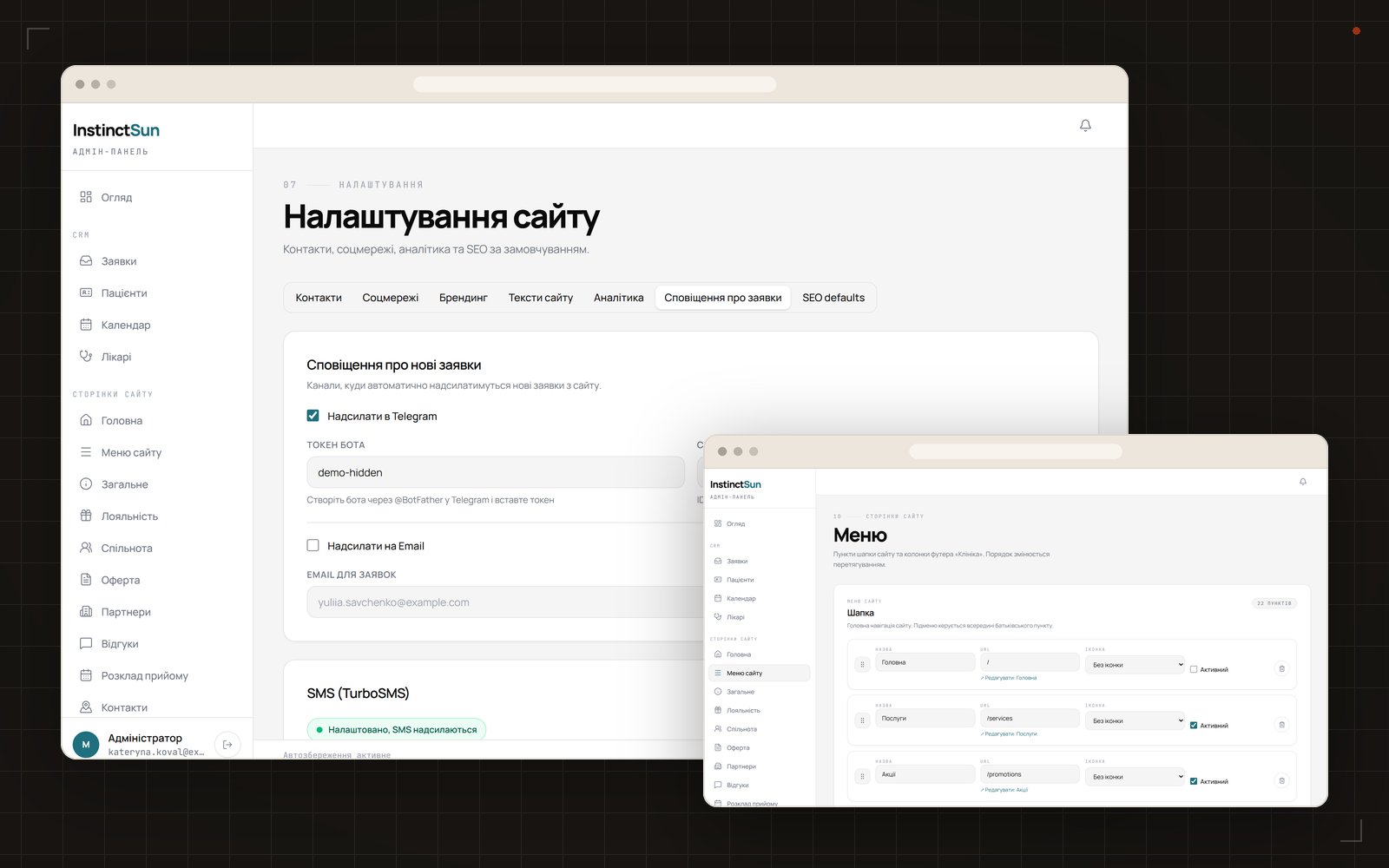
You can see the interfaces and the project summary in the Інстинкт Сонця case study. Below, we examine the working logic rather than a feature presentation: what happens from selecting a time to arranging a return visit.
What is a clinic CRM, and how is it different from just a website?
Short answer: a website answers a patient’s questions before they contact the clinic, while a CRM carries the request forward. It receives the lead, checks it against the doctor’s schedule, shows the current status to the administrator, merges repeat requests into one patient card, and stores visit history. The doctor works in a dedicated module rather than a shared lead list: they record complaints, diagnosis, treatment instructions, and prescriptions, then print the required form. Separate rules trigger Telegram notifications, SMS, and a follow-up lead. A clinic CRM is therefore the connection between the public website, schedule, administrator, doctor, and patient. If a website only emails a form, it has no availability control, shared history, or protection from duplicate data entry. In a working system, every action changes one shared record that is visible only to a role with the required access. A CRM like this must be checked across the full route, from an available slot to the medical record, notification, and controlled document access.
The custom admin panel in this project has 48 screens and follows the principle “admin panel = website mirror.” Each page type has content fields and an SEO tab with a search snippet preview. Roles are divided into administrator, manager, and doctor, while the ability to manage doctors and schedules is a separate permission. Access is checked at page level.
The data path can be seen in a single enquiry. A patient selects a slot on the website, then the saved lead appears in the pipeline and notifies the team in Telegram. The manager confirms the appointment, and the system sends an SMS. Using the phone number, the request joins an existing patient card or becomes the basis of a new one. After the visit, the doctor adds the medical record and creates a follow-up when needed. This chain does not require staff to copy the name, phone number, doctor, and time between separate spreadsheets.
How does online booking show genuinely available slots?
A slot is not stored as an arbitrary time in a form. The system takes the selected doctor’s schedule and subtracts existing bookings every time. The patient follows a fixed sequence: doctor, service, date, time, and contact details. The calendar is open five months ahead.
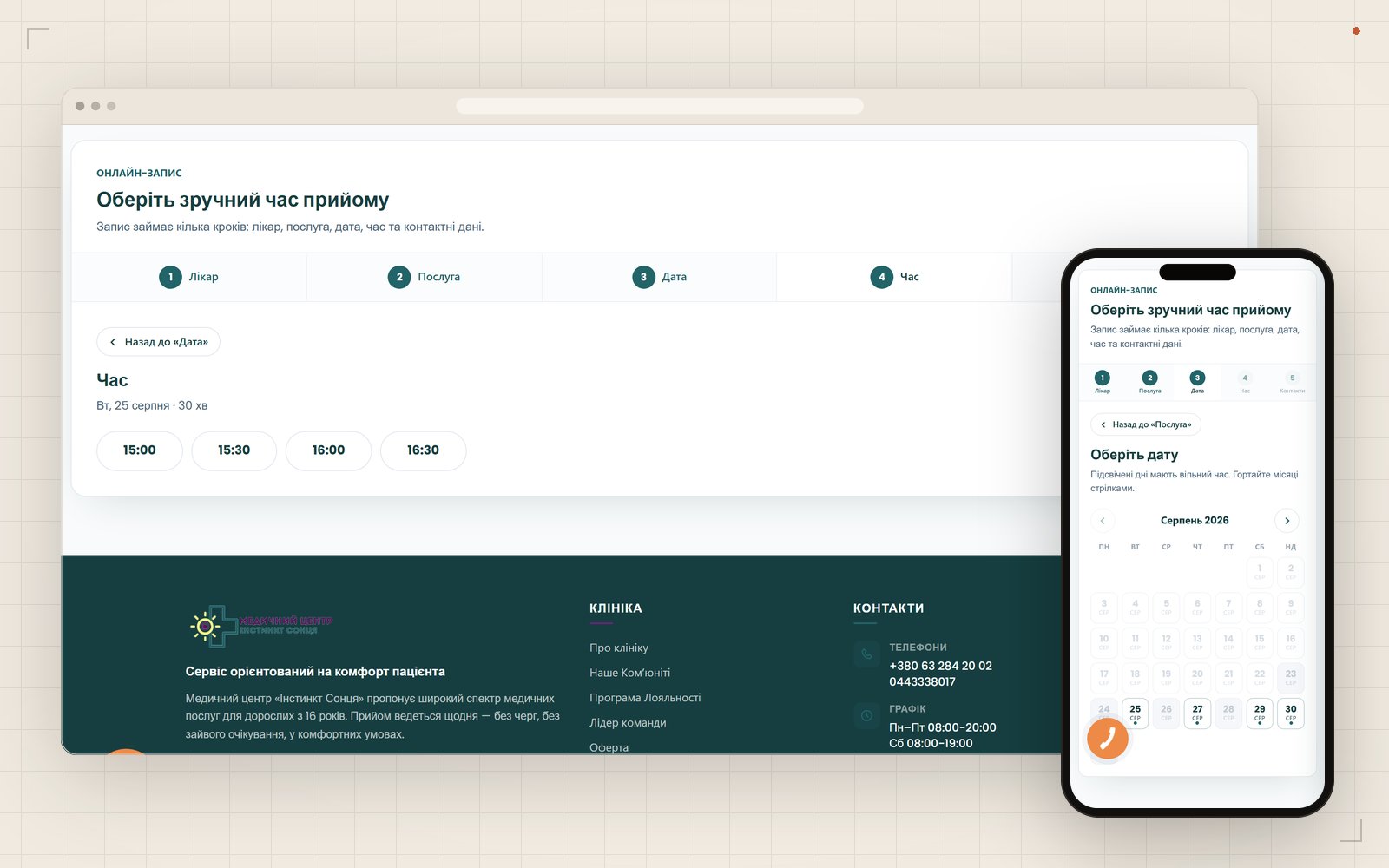
Why does the grid step equal the service duration?
Different services take different amounts of time, so one fixed grid would create gaps or overlaps. Once the patient chooses a service, its duration becomes the step used to calculate available start times. The patient sees times that fit the selected doctor’s schedule, not a decorative list of hours.
What happens when two people book at the same time?
Availability is checked again when the booking is saved. The first successful request takes the slot. The second user receives a refusal, and the occupied time disappears from the list. This handles a scenario that a regular form with a “preferred time” field cannot solve. We explain the basic logic in more detail in our article about online booking systems for businesses.
How do the lead pipeline and administrator calendar work?
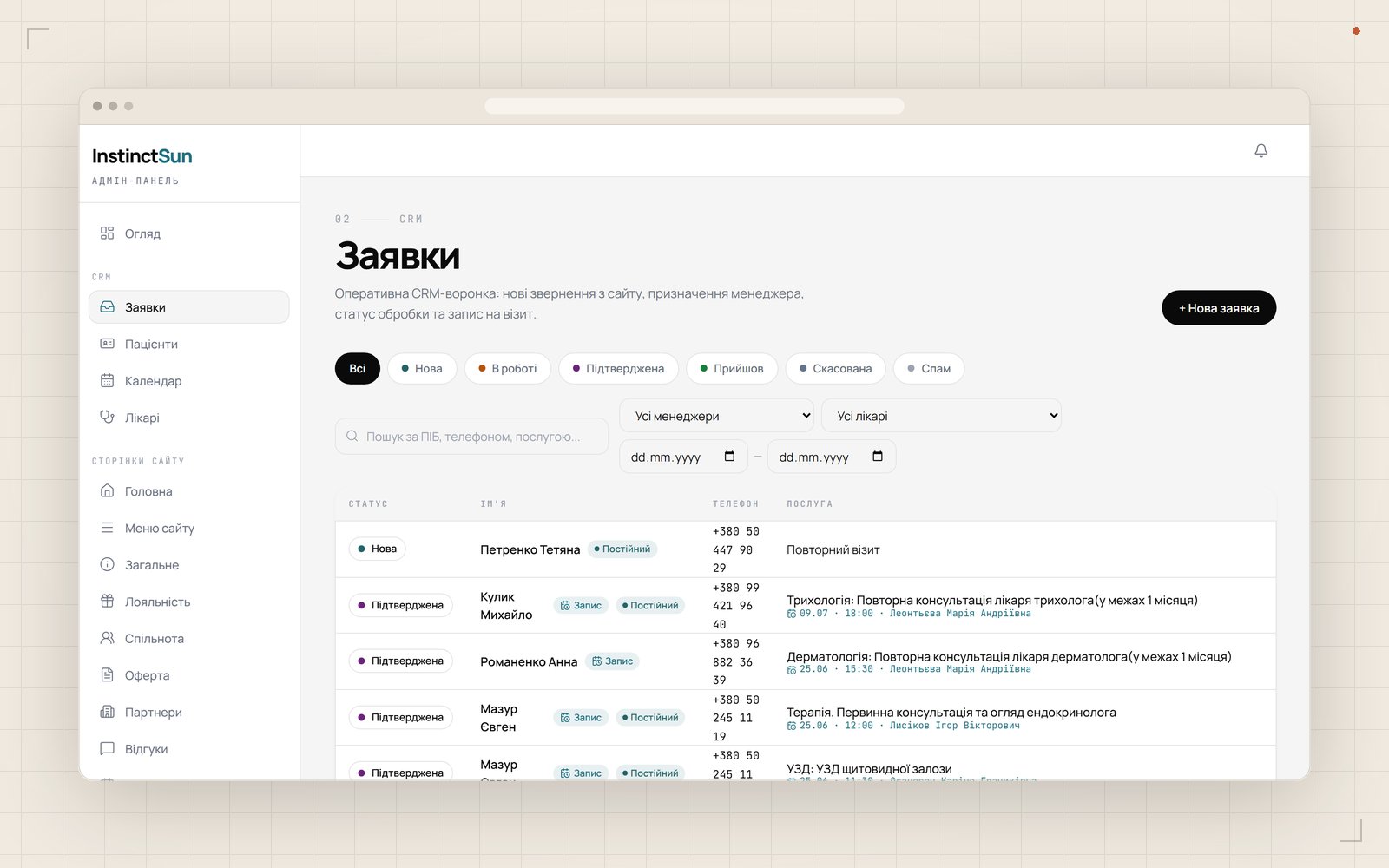
Every lead has a state and a complete history. It moves through the following pipeline: new, in progress, confirmed, arrived, cancelled, or spam. The administrator can see which lead needs a call and which visit is already confirmed. A new lead immediately triggers a Telegram notification.
- New: the request has just entered the system.
- In progress: a manager is already handling the lead.
- Confirmed: the time has been agreed with the patient.
- Arrived: the planned visit took place.
- Cancelled or spam: the lead should no longer remain among active appointments.
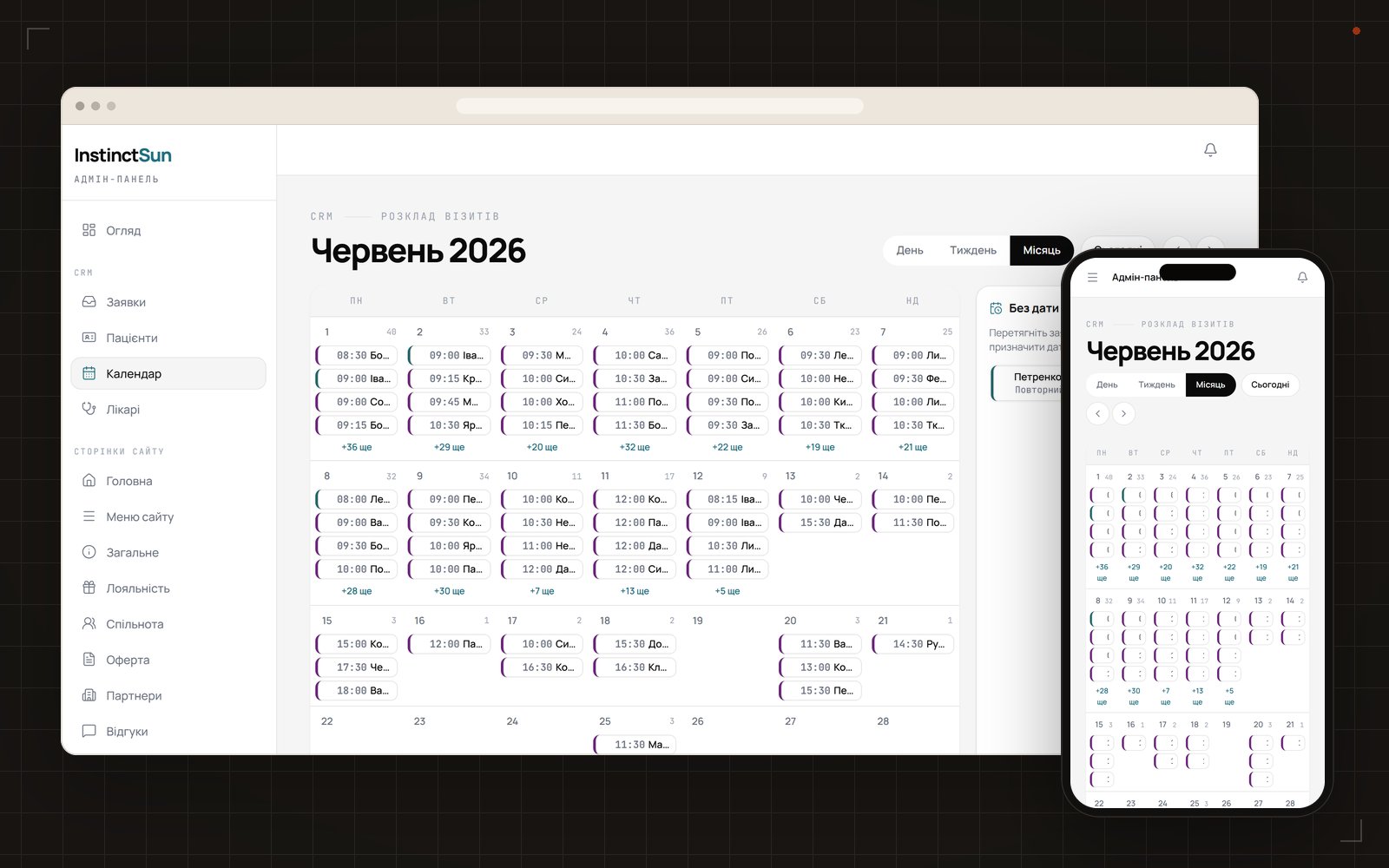
An appointment can be dragged to another date in the calendar. The change does not create a separate, inconsistent copy: the lead card keeps the history, and the new time remains part of the same process. This gives the manager one daily workspace instead of messages, a spreadsheet, and a paper log.
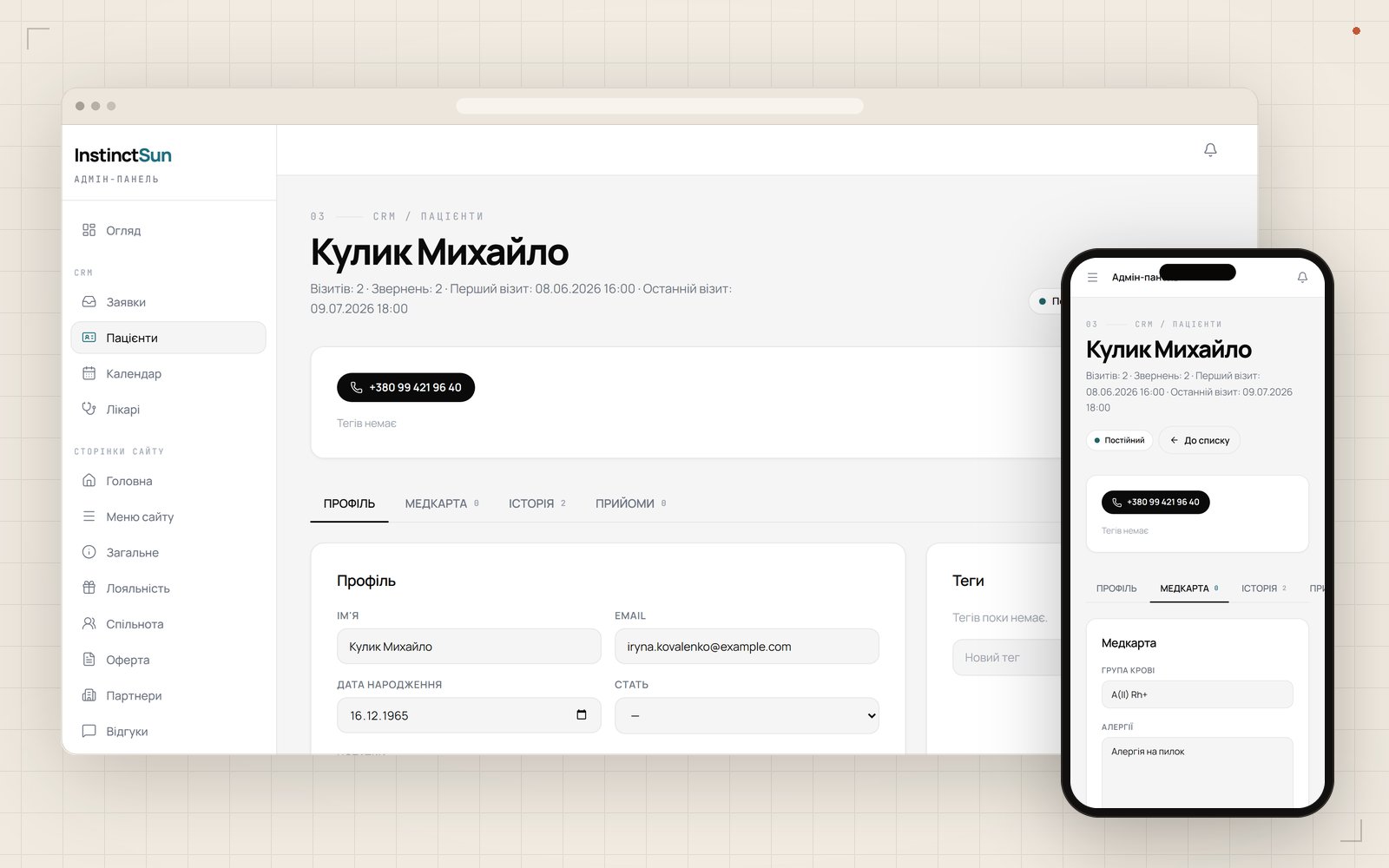
What is stored in the patient card and medical record?
The patient card collects every request from the same person. Leads are merged by phone number, so a repeat booking does not create a new isolated profile. The card contains medical information, visit history and count, while a separate badge identifies a returning patient.
For an administrator, this removes duplicates created on different dates. For a doctor, it preserves the sequence of visits. The returning-patient badge is not a separate list: it appears on the same card that already contains earlier visits. At the time of this case study, production contained 404 patient cards.
Why are medical documents kept outside the public folder?
A file in the web server’s public directory can be returned through a direct address if its path becomes known. In this system, documents are stored outside the public folder. Access goes through a protected route after an authorization check. This creates a technical boundary between public website assets, such as service photos, and a patient’s private files.
What does the doctor record during a visit?
The visit module saves consultation data in the patient card. The doctor enters complaints, diagnosis, treatment instructions, and prescriptions. BMI is calculated automatically. Reusable visit templates and a “repeat previous” command prevent the doctor from typing the same structure again.
The record produces three printed forms: a consultation report, prescription sheet, and referral. If the doctor sets a follow-up date, the system creates a new lead in the pipeline. The next contact does not remain a note that an administrator has to notice by chance.
The template and repeat command reduce repeated input without replacing the doctor’s decisions. Complaints, diagnosis, treatment instructions, prescription, and the next contact date remain separate parts of the visit. The printed forms are therefore assembled from the current record rather than from a copy of an old document.
How do patient SMS messages work, and what needs to be tested?
An SMS is tied to an event instead of a manually copied phone number. The module supports five scenarios: new lead, confirmation, reminder, cancellation, and rescheduling. Quiet hours run from 21:00 to 9:00, deduplication filters repeated messages, and reminders follow a schedule.
Which defects did the pre-launch audits find?
Testing real transitions between states found eight defects in the SMS module, four of them serious. A row with a failed status could permanently block the next reminder. When an appointment was moved, the system sent cancellation text containing the new date. Both scenarios were fixed before launch.
The audits also showed that a lead could fail silently because of an error in the phone number, while deactivating a user did not revoke their active session. These issues were also fixed before production. Testing a system like this must cover more than successful booking: retries, delivery errors, rescheduling, access changes, and concurrent booking all matter.
How do you migrate an old clinic website without losing working URLs?
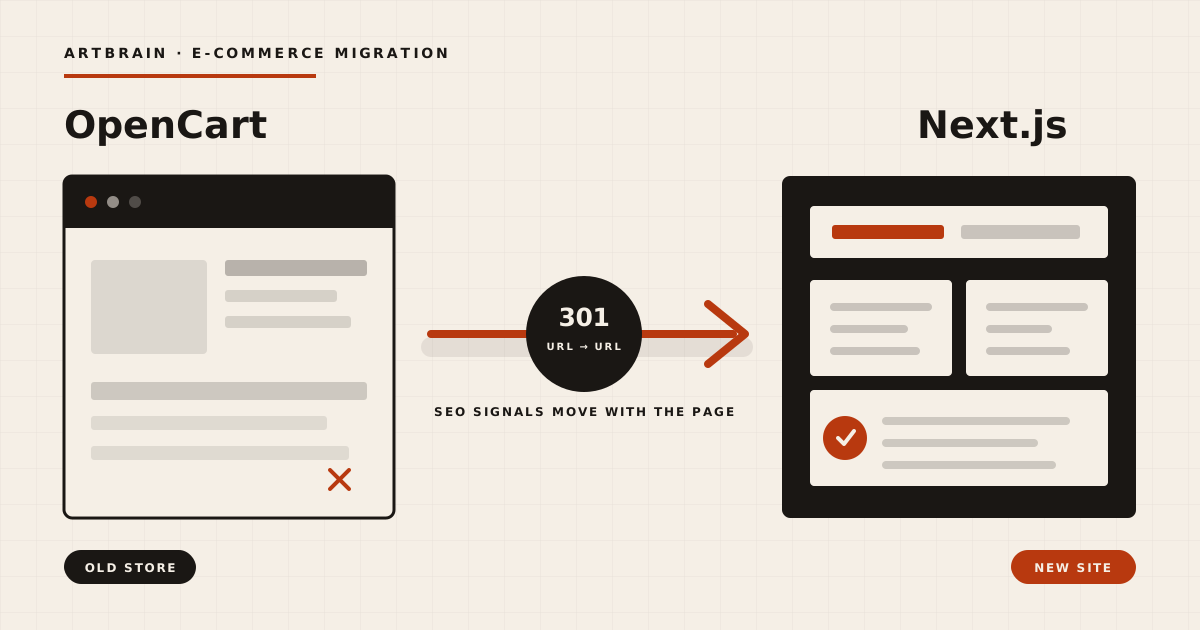
First, build a complete map of old URLs, then assign a new destination to each address. The old website had more than 800 URLs. The launch included 932 redirects and a 599-URL sitemap, JSON-LD for MedicalOrganization, Physician, MedicalProcedure, and Article entities, plus a Search Console setup from scratch.
We separately reviewed 234 landing addresses receiving advertising traffic. Five returned 404 responses, while another 22 opened the general catalog instead of the relevant section. Every affected address was redirected. This part of migration is easy to miss if the review only covers the new website menu.
For advertising, a successful page response does not necessarily mean a correct landing page. An address may open without an error but take the visitor to the wrong service. That is why this project reviewed both the technical response of each URL and the actual destination of every advertising visit.
The public website has 22 routes. In production, the home page responds in 0.18 seconds.
What did the clinic receive, and how much does a similar system cost?
The production result can be described with current counts. The system handles 295 services across 31 categories and five groups, 23 doctors, 285 articles, 46 promotions, 531 leads, and 404 patient cards. It connects the public website, 48 admin screens, CRM, doctor visits, notifications, and the SEO migration.
The technical scope is about 51,000 lines of TypeScript. The stack includes Next.js 16, React 19, TypeScript, PostgreSQL 17, and Prisma 7 with 79 models. Authentication uses next-auth and bcrypt, SMS messages go through the TurboSMS API, and internal notifications use the Telegram Bot API.
When should a clinic consider a custom system?
A ready-made product can be the starting point when its standard roles, patient card, and booking flow fit the clinic. Custom development makes sense when the system must calculate slots from your services, mirror the public website in the admin panel, apply separate schedule permissions, store private documents, and migrate a large set of legacy URLs.
An initial estimate needs working data rather than a list of desired modules: staff roles, doctor schedules, service durations, lead statuses, patient card fields, form templates, SMS events, and old URLs. These inputs show which parts can remain standard and where the clinic needs its own logic.
What budget should a clinic use as a reference?
An Artbrain corporate website starts at $1,200, while CRM development starts at $3,000. A website, online booking, CRM, and doctor module are scoped together after a brief because the work depends on roles, data, migration, and required scenarios. We have a separate page about CRM development for clinics and medical centers.
FAQ
What is a CRM for a clinic?
A clinic CRM stores leads, schedules, patient cards, visit history, and staff actions in one process. It continues the workflow after a website enquiry and separates access between the administrator, manager, and doctor.
How does online doctor booking with available slots work?
The system takes the selected doctor’s schedule, subtracts occupied bookings, and builds slots using the service duration as the step. If two people choose the same time concurrently, the first booking takes the slot and the second user receives a refusal.
What should a CRM patient card contain?
In this case, the card contains a medical record, visit history and count, documents, and linked leads. Repeat requests are merged by phone number, while private files are stored outside the website’s public folder.
How much does a clinic CRM cost?
CRM development at Artbrain starts at $3,000, while a corporate website starts at $1,200. The combined budget for the website, booking, and medical modules is determined after a brief.
Should a clinic choose a ready-made medical system or a custom CRM?
A ready-made product fits when roles and the booking process follow its standard logic. A custom CRM is worth evaluating when the clinic needs its own statuses, schedules, documents, access rules, integrations, or migration of a large legacy website.
FAQ
What is a CRM for a clinic?
A clinic CRM stores leads, schedules, patient cards, visit history, and staff actions in one process. It continues the workflow after a website enquiry and separates access between the administrator, manager, and doctor.
How does online doctor booking with available slots work?
The system takes the selected doctor’s schedule, subtracts occupied bookings, and builds slots using the service duration as the step. If two people choose the same time concurrently, the first booking takes the slot and the second user receives a refusal.
What should a CRM patient card contain?
In this case, the card contains a medical record, visit history and count, documents, and linked leads. Repeat requests are merged by phone number, while private files are stored outside the website’s public folder.
How much does a clinic CRM cost?
The price depends on scope, integrations and timeline. We prepare an exact estimate after a free review of your task.
Should a clinic choose a ready-made medical system or a custom CRM?
A ready-made product fits when roles and the booking process follow its standard logic. A custom CRM is worth evaluating when the clinic needs its own statuses, schedules, documents, access rules, integrations, or migration of a large legacy website.